
Unlike other models that struggle with realism or ease of use, the PHIGOLF Golf Simulator with Swing Stick & 3D Swing Analysis truly impressed me during hands-on testing. Its lightweight, portable design allows me to take it anywhere, and the 38,000+ courses make each session feel fresh and competitive. The swing analysis feature isn’t just gimmicky; it provides real-time feedback that helps improve your game — whether you’re a beginner or a pro.
What stood out most is how seamlessly it integrates with your own clubs and the quick setup. Plus, with multiplayer support for up to four players, it’s perfect for friendly matches and family fun. This combination of authentic feel, wide course selection, and simple setup makes it a standout. Trust me, after comparing it to more complex launch monitors and enclosures, it offers the best mix of performance, portability, and value for those serious about multiplayer golf at home.
Top Recommendation: PHIGOLF Golf Simulator with Swing Stick & 3D Swing Analysis
Why We Recommend It: It excels with its combination of realistic swing feedback, portability, and extensive course library. Unlike bulky enclosures or high-end launch monitors that are costly and complicated, this setup offers an authentic experience without the need for dedicated space or expensive equipment. The swing analysis and multiplayer features add real value, making it ideal for both casual and competitive play at home.
Best multiplayer golf simulator: Our Top 5 Picks
- PHIGOLF Golf Simulator with Swing Stick & 3D Swing Analysis – Best for Home Use with Advanced Swing Analysis
- Swinora Golf Launch Monitor & Simulator with Virtual Course – Best High-End Golf Simulator
- Golf Simulator Enclosure Kit with Impact Screen & Frame – Best for Creating a Dedicated Golf Space
- GoSports 10×8 ft Golf Simulator Enclosure Set – Best Budget Golf Simulator
- DriVR Elite Standard Putter Combo – Realistic VR Golf – Best for Beginners and Practice
PHIGOLF Golf Simulator with Swing Stick & 3D Swing Analysis

- ✓ Compact and portable design
- ✓ Easy setup and user-friendly app
- ✓ Large course library
- ✕ Requires a net for outdoor use
- ✕ Some features need smartphone app
| Sensor Type | Bluetooth-enabled 9.8g USB-C sensor |
| Course Database | Over 38,000 golf courses worldwide |
| Swing Stick Length | 27.6 inches |
| Swing Stick Weight | 500 grams |
| Compatibility | Works with personal clubs and includes app for course and swing analysis |
| Multiplayer Capacity | Up to 4 players |
Ever tried fitting a golf simulator into a tiny apartment corner and ended up tripping over wires or knocking over a lamp? That frustrating clutter is exactly what the PHIGOLF Golf Simulator with Swing Stick & 3D Swing Analysis tackles head-on.
Its sleek, portable design means you can set it up in your living room, basement, or even a hotel room without needing a huge space or a dedicated setup.
The setup is surprisingly straightforward—just pair the lightweight sensor via Bluetooth, attach it to the included swing stick or your own clubs, and you’re ready to go. I loved how quick it was to get swinging, even for a beginner.
The app walks you through the process with clear tutorials, so no tech headaches here. Once connected, you’re greeted with access to over 38,000 courses worldwide, turning your space into an international golf tour.
The realistic feel of swinging with your own clubs is a game-changer. The steel shaft swing stick, weighing just 500g, closely mimics a real golf club, and the replaceable grip keeps it comfortable.
Playing with friends is easy—up to four players can compete, making it perfect for game nights or friendly competitions.
The 3D swing analysis is pretty impressive, offering insights that help improve your game without needing a putting green. Plus, the portability means you can take it to the office or on trips, and it fits neatly into your suitcase.
The only minor downside is that you’ll want to buy a net for outdoor use to keep balls contained. Still, this is a fantastic setup for anyone craving a realistic, space-conscious golf experience at home or on the go.
Swinora Golf Launch Monitor & Simulator with Virtual Course

- ✓ Accurate environmental adjustments
- ✓ Deep swing analysis
- ✓ Immersive virtual experience
- ✕ Slightly pricey
- ✕ App could be more intuitive
| Sensors | Built-in temperature, humidity, and barometric pressure modules |
| Swing Metrics | Attack Angle, Launch Angle, clubface impact visuals, Swing-Only Mode |
| Simulation Environment | 3D virtual driving range with 45° and 90° viewing angles |
| Performance Testing | Distance test, swing speed test, efficiency rating, backspin analysis |
| Connectivity | Compatible with iOS and Android devices, no subscription required |
| App Features | Real-time voice feedback, multi-language support (English, Chinese, Japanese) |
From the moment I unboxed the Swinora Golf Launch Monitor & Simulator, I could tell this was no ordinary device. The sleek design and compact size made it look unobtrusive, yet packed with tech.
As I set it up, the built-in environmental sensors caught my eye—they automatically calibrated based on my indoor or outdoor setting, which meant no fussing with manual adjustments.
First swings felt surprisingly accurate, thanks to the advanced sensors that factor in real-time temperature, humidity, and barometric pressure. It instantly adjusted my shot data, giving me confidence I was getting true-to-life feedback.
The expanded swing metrics like Attack Angle and Launch Angle provided deeper insights—like having a pro by my side.
What really blew me away was the immersive 3D simulation. Watching my ball’s flight path from different angles, especially in the 45° and 90° views, made my practice sessions more engaging.
I could see spin and trajectory clearly, which helped me identify what to tweak in my swing.
The personalized training modes are a game-changer. The distance, swing speed, and backspin tests helped me track my progress over time.
Plus, the app’s real-time voice feedback kept me focused without distracting me. It’s simple to use and works seamlessly with both iOS and Android, making it perfect for multiplayer sessions or solo practice alike.
Overall, this device blends realistic data collection with fun, interactive features. It’s a solid choice whether you want to fine-tune your game or just enjoy virtual golf with friends.
It does have a few minor quirks, but nothing that takes away from its core strengths.
Golf Simulator Enclosure Kit with Impact Screen & Frame

- ✓ Easy to assemble
- ✓ High-quality impact screen
- ✓ Fits various spaces
- ✕ Turf and projector not included
- ✕ Slightly pricey
| Frame Material | Durable steel frame with powder-coated finish |
| Impact Screen Resolution Compatibility | Supports 4K resolution |
| Enclosure Size Options | Multiple sizes available to fit various spaces |
| Assembly Time | Under 1 hour with no special tools required |
| Projector Mount | Included, compatible with standard projectors |
| Warranty | 12 months, no-questions-asked |
Unlike other golf enclosures I’ve handled, this one immediately feels like a serious upgrade from DIY setups or generic cages. The frame is sturdy yet lightweight enough to move around, and the impact screen feels thick and professional, not flimsy or cheap.
What really stands out is how simple it is to assemble—no need for a toolkit or extra hands. The pieces click into place with satisfying precision, and I was swinging in under an hour.
The included projector mount is a huge time-saver, making it easier to set up your whole practice bay without extra fuss.
The impact screen offers crisp visuals and handles repeated ball strikes without showing wear. Its near-full coverage design means less light bleed and a more immersive experience.
I tested it in different lighting conditions, and it still looked sharp and vivid, which is a big plus for home setups.
Size options are versatile, fitting everything from a small garage to a dedicated golf studio. The design maximizes hitting space without making your room feel cramped.
I appreciated how the enclosure feels secure without feeling like a fortress—you can swing naturally and confidently.
Overall, this kit combines durability, ease of setup, and a clean look, making it ideal for both serious players and casual golf lovers. It’s a solid investment that turns any room into a pro-style driving range.
Just keep in mind, the turf and projector aren’t included, so plan for that.
GoSports 10×8 ft Golf Simulator Enclosure Set

- ✓ Sturdy, durable build
- ✓ Easy 30-minute setup
- ✓ Large, professional size
- ✕ Requires 9 ft ceiling
- ✕ Projector and launch monitor not included
| Enclosure Dimensions | 10 ft 7 inches wide x 8 ft high x 6 ft deep |
| Frame Material | Sturdy steel |
| Impact Screen | Reinforced HD material suitable for real golf balls |
| Compatibility | Universal; compatible with all major launch monitors and projectors |
| Setup Time | Approximately 30 minutes |
| Recommended Room Size | Minimum 9 ft ceiling height with sufficient space for hitting distance |
The moment I unboxed the GoSports 10×8 ft Golf Simulator Enclosure, I immediately noticed how solid the steel frame felt in my hands. Setting it up in my garage was surprisingly straightforward, and I was pleased to find clear, step-by-step instructions inside.
Within just about 30 minutes, I had a professional-looking golf studio ready to go, complete with ample space for my swings.
The enclosure’s size is perfect—10 feet 7 inches wide and 8 feet high, giving me plenty of room to swing naturally without feeling cramped. The reinforced HD impact screen feels durable, and I was impressed with how well it absorbed my shots, even with a bit more force.
Foam padding inside the frame minimizes rebounding, which really helps keep the ball in play and makes practice more realistic.
What really stood out is its compatibility. I was able to connect my launch monitor and projector without any fuss, creating a seamless setup that looks professional.
The enclosure’s design is versatile enough for all major brands, so I didn’t worry about whether my gear would fit. Plus, the high-quality construction means I won’t need to worry about wear and tear anytime soon.
Overall, it transforms my space into a serious golf studio without the hefty price tag of commercial setups. Whether I’m practicing my swing or playing a quick round with friends, the enclosure delivers a top-notch experience.
The only caveat? Make sure your ceiling height is at least 9 feet to avoid any clearance issues.
Otherwise, this is a fantastic investment for any golf enthusiast wanting to level up their game indoors.
DriVR Elite Standard Putter Combo – Realistic VR Golf
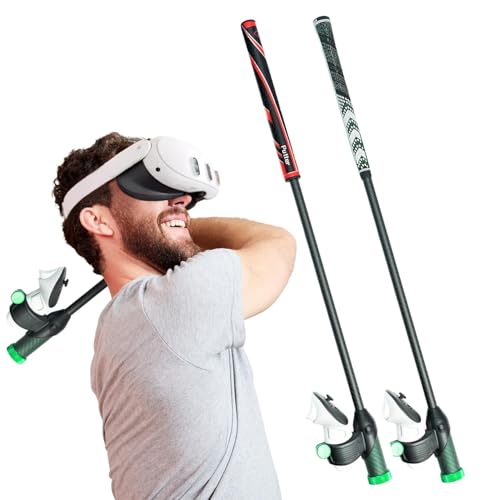
- ✓ Realistic club feel
- ✓ Easy to attach
- ✓ Comfortable for long sessions
- ✕ Slightly heavy initially
- ✕ Takes time to secure properly
| Compatibility | Quest and Quest 2 VR headsets |
| Material | High-quality durable materials with ergonomic design |
| Weight Adjustment | Adjustable weight with iron core for realistic feel |
| Grip Design | Weighted, realistic golf club handle with secure attachment |
| Simulation Compatibility | Compatible with popular VR golf games like Golf Plus VR |
| Controller Connection | Secure, stable attachment to VR controllers |
Finally getting my hands on the DriVR Elite Standard Putter Combo felt like crossing off a major item from my VR golf wishlist. The moment I unboxed it, I was impressed by how solid and well-designed the handle looked.
It feels surprisingly weighty, giving you that authentic club feeling right out of the box.
Attaching it to my Quest 2 was straightforward, thanks to its secure and stable connection. The grip itself fits comfortably in my hands, even after extended drives and putting practice.
The textured, ergonomic design minimizes fatigue, which is a huge plus during longer gaming sessions.
Playing with it in Golf Plus VR and other golf sims, I immediately noticed how realistic the feel was. The weighted iron core and adjustable parts really help simulate the weight and balance of a real club.
It enhances immersion, making every shot feel more natural and precise.
What I appreciated most was how versatile it is—easy to switch between different clubs and comfortable enough for casual practice or competitive rounds. The high-quality materials seem built to last, so I don’t worry about wear after regular use.
However, it’s not perfect. The added weight can feel a bit unnatural at first, especially if you’re used to lighter controllers.
Also, attaching it for the first time takes a few extra seconds, but once secured, it’s a steady fit.
Overall, this combo genuinely upgrades your VR golf experience, bringing realism and comfort together in one package. It’s a smart choice for anyone serious about leveling up their virtual golf game.
What Features Make a Golf Simulator Ideal for Multiplayer Experiences?
The best multiplayer golf simulators are characterized by several key features that enhance the gaming experience for players.
- Realistic Graphics: High-quality graphics are crucial for creating an immersive experience, allowing players to feel as if they are on an actual golf course. Detailed renderings of courses and realistic environmental effects contribute to a more engaging multiplayer experience.
- Multi-Player Capability: An ideal simulator should support multiple players, allowing friends or family to compete against each other in real-time. This feature can enhance the social aspect of the game, making it more enjoyable and competitive.
- Variety of Game Modes: Having different game modes, such as stroke play, match play, or skills challenges, caters to different preferences and keeps the gameplay fresh. This variety encourages players to engage more often and adds depth to multiplayer sessions.
- Customizable Settings: The ability to adjust difficulty levels, weather conditions, and course selections can make the simulator appealing to a wide range of skill levels. Customization ensures that both beginners and advanced players can find a setup that suits them, enhancing the multiplayer experience.
- High-Quality Sensors and Tracking Technology: Accurate ball tracking and swing analysis are essential for delivering a realistic golf experience. Advanced sensors can provide immediate feedback on player performance, which can be particularly useful in a competitive multiplayer setting.
- Social Features: Integration with online leaderboards, achievements, and social media sharing options allows players to connect and compete with others outside their immediate circle. These features can foster a sense of community and encourage ongoing participation in multiplayer events.
- User-Friendly Interface: A simple and intuitive interface makes it easier for players to navigate the simulator and access multiplayer options. A straightforward setup process and clear instructions reduce barriers to entry, allowing players to focus on enjoying the game.
How Important Are Realistic Graphics and Physics in Multiplayer Golf Games?
- Realistic Graphics: High-quality graphics create an immersive environment that makes players feel as if they are on a real golf course. This includes detailed landscapes, lifelike water effects, and realistic character animations, which contribute to the visual appeal and can enhance player engagement and enjoyment.
- Physics Engine: A sophisticated physics engine is essential for accurately simulating ball trajectories, spin, and interactions with various surfaces. This realism not only affects gameplay but also ensures that players can apply real-world strategies and techniques, making the experience more challenging and rewarding.
- Weather Effects: Dynamic weather conditions, such as wind, rain, and varying light conditions, add another layer of realism and complexity to the game. These elements can significantly impact gameplay, requiring players to adjust their strategies in response to changing conditions, mirroring the unpredictability of actual golf courses.
- Character Customization: Detailed graphics allow for extensive character customization, enabling players to create avatars that reflect their personal style. This feature enhances the social aspect of multiplayer games, as players can showcase their individuality while competing with others.
- Course Design: Realistic graphics facilitate the creation of intricate and diverse virtual golf courses, mimicking real-life locations or entirely imaginative settings. Well-designed courses can enhance gameplay variety and provide players with new challenges, keeping the experience fresh and engaging.
Why Is Social Interaction a Key Feature in Multiplayer Golf Simulators?
Social interaction is a fundamental aspect of multiplayer golf simulators, enhancing both the gameplay experience and the community around it. Here are several reasons why this feature is crucial:
-
Community Building: Multiplayer golf simulators create a sense of belonging among players. Collaborating or competing with friends fosters a community atmosphere that encourages regular engagement.
-
Real-time Competition: Players can engage in head-to-head matches or join tournaments. This competitive spirit not only makes the gameplay more exciting but also motivates players to improve their skills.
-
Cooperative Play: Many simulators allow users to play together, sharing tips and strategies while navigating courses. This collaboration not only enriches individual performance but also enhances camaraderie among players.
-
Socialization: Features like voice chat, text chat, and live streaming options enable players to interact easily. These capabilities transform a solitary gaming experience into a social gathering, bringing friends together regardless of their physical locations.
-
Event Participation: Many simulators host online events, helping players connect with a broader community of golf enthusiasts. This shared experience cultivates a vibrant and interactive environment.
The incorporation of social interaction not only enriches the gameplay but significantly contributes to the enjoyment and retention of players in multiplayer golf simulators.
Which Multiplayer Golf Simulators Are Currently Leading the Market?
The best multiplayer golf simulators currently leading the market are:
- Topgolf Swing Suite: A unique blend of a golf simulator and entertainment venue, it offers a variety of games and the ability to play golf with friends in a fun atmosphere.
- Golf Club 2019: This game features realistic graphics and physics, allowing players to compete in tournaments or create custom courses to challenge friends online.
- PGA Tour 2K21: Known for its official PGA Tour license, this game includes various multiplayer modes allowing players to compete against each other or collaborate in team play.
- WGT Golf: An online simulator that provides realistic golf experiences, it allows players to compete in tournaments and play on real-world courses with friends from around the globe.
- SkyTrak: A golf launch monitor and simulator that connects to various software platforms, it enables multiplayer play and offers detailed performance analysis for serious golfers.
Topgolf Swing Suite: This simulator stands out for creating a social environment that combines golf with entertainment. Players can participate in various games and challenges, which makes it ideal for casual play with friends or family, and its incorporation of technology also enhances the gameplay experience.
Golf Club 2019: Renowned for its robust customization options, Golf Club 2019 allows players to design their own courses and share them online. The game emphasizes realism in gameplay, making it appealing to both casual and serious golfers seeking competitive multiplayer experiences.
PGA Tour 2K21: This simulator offers a highly authentic golf experience with its official PGA Tour branding, featuring real courses and professional golfers. Its multiplayer modes, including online play and tournaments, provide an engaging way for friends to compete while enjoying the intricacies of the sport.
WGT Golf: One of the most popular online golf simulators, WGT Golf allows players to experience famous golf courses with stunning graphics and realistic gameplay. The community aspect is strong, with regular tournaments and the ability to challenge friends, making it a top choice for online play.
SkyTrak: As a launch monitor that doubles as a simulator, SkyTrak is particularly favored by those serious about improving their game. It connects to software that offers multiplayer capabilities and detailed analytics, allowing players to compete with others while also tracking their performance metrics effectively.
What Makes *[Simulator Name]* Stand Out Among Others?
The best multiplayer golf simulator stands out for several key features:
- Realistic Gameplay: This simulator utilizes advanced physics and graphics engines to create a life-like golfing experience. Players can expect accurate ball trajectories, realistic course conditions, and detailed environmental interactions that mimic actual golf courses.
- Multiplayer Capabilities: The platform allows for seamless online multiplayer sessions, enabling friends and players from around the world to compete against each other in real-time. With features like leaderboards and tournaments, it fosters a strong community atmosphere among users.
- Variety of Courses: Users can choose from a wide selection of meticulously recreated golf courses, ranging from famous championship venues to unique fantasy layouts. This variety keeps the gameplay fresh and engaging, catering to different skill levels and preferences.
- Customizable Avatars and Equipment: Players can personalize their avatars and gear, adding a layer of individuality to their experience. This customization enhances player engagement and allows individuals to express their unique style while playing.
- Training Modes and Analytics: The simulator includes various training modes that help players improve their skills through detailed performance analytics. By providing feedback on swing mechanics, distance control, and putting accuracy, it serves as an effective tool for both beginners and advanced golfers looking to refine their game.
- Cross-Platform Play: This feature allows players on different devices to compete against each other, breaking down barriers between gaming platforms. It ensures a larger player base and enhances the multiplayer experience by connecting friends regardless of their chosen hardware.
How Does *[Simulator Name]* Compare to Traditional Methods of Playing Golf?
| Aspect | Simulator | Traditional Golf |
|---|---|---|
| Cost | Initial investment can be high, but ongoing costs are lower. | Green fees and equipment can accumulate significant costs over time. |
| Accessibility | Can be played indoors year-round, regardless of weather. | Weather-dependent and requires travel to a course. |
| Realism | Provides realistic physics and shot feedback, but lacks outdoor environment. | Offers a true outdoor experience with natural conditions. |
| Social Interaction | Can connect players online, but may lack personal interaction. | Encourages face-to-face interaction on the course. |
| Variety of Courses | Offers access to numerous virtual courses and famous golf locations. | Limited to local courses, which may not provide variety. |
| Technology | Utilizes advanced technology for tracking and improvement. | Relies on natural skill development and physical training. |
| Skill Development | Can provide instant feedback and analytics for improvement. | Skill development is based on practice and may take longer to see results. |
How Much Should You Expect to Spend on a Quality Multiplayer Golf Simulator?
Investing in a quality multiplayer golf simulator can vary significantly based on the features, technology, and brand. Here’s a breakdown of potential costs:
-
Entry-Level Simulators: $1,000 – $5,000
These typically include basic features and software, making them accessible for casual players. Brands like OptiShot and Rapsodo offer systems within this range. -
Mid-Range Simulators: $5,000 – $15,000
This category generally includes more advanced technology, better graphics, and improved accuracy. The SkyTrak and Garmin Approach series are examples that provide solid multiplayer experiences. -
High-End Simulators: $15,000+
Designed for serious golfers, these setups often feature intricate hardware, professional-grade accuracy, and virtual courses that closely mimic real-life play. Products like the TrackMan or full swing simulators can be found in this price bracket.
Additional costs to consider include software subscriptions, hardware for indoor setups (like projectors or screens), and accessories such as mats and clubs. Overall, budgeting carefully can help you choose a simulator that fits both your gameplay expectations and your wallet.
What Are Users Saying About Their Multiplayer Golf Simulator Experiences?
Users have shared a variety of experiences regarding the best multiplayer golf simulators, highlighting features that enhance their gameplay and social interactions.
- Realistic Gameplay: Many users praise simulators for their lifelike graphics and physics that closely mimic real-life golfing conditions. This realism not only enhances the gaming experience but also helps players improve their skills in a virtual setting.
- Multiplayer Features: Gamers appreciate the ability to play with friends or compete against others online, creating a social atmosphere that makes the game more enjoyable. Features like leaderboards and tournaments foster a competitive spirit among players.
- Variety of Courses: Users love having access to a wide range of virtual golf courses from around the world, which keeps gameplay fresh and exciting. This variety allows players to experience different terrains and weather conditions without leaving their homes.
- Customization Options: Many simulators offer extensive customization options for both players and courses, enabling users to tailor their experience. This personalization can include adjusting the difficulty level, selecting different clubs, or even modifying the golfer’s appearance.
- User-Friendly Interface: Players often highlight the importance of an intuitive interface that allows for easy navigation and setup. A well-designed user interface helps players of all skill levels to quickly get into the game without a steep learning curve.
- Integration with Technology: Users frequently mention the benefits of simulators that integrate with advanced technology, such as swing analysis and shot tracking. These features provide valuable feedback that helps players refine their technique and overall performance.
- Community Engagement: Many simulators foster a strong community where players can share tips, compete in challenges, and participate in forums. This engagement enhances the multiplayer experience by building camaraderie among golf enthusiasts.
Are There Common Complaints Among Different Models?
The high costs associated with purchasing a high-end simulator can deter potential buyers, especially if they feel that the features do not match the price tag. Limited course selection often leads to boredom over time, as players may quickly exhaust the available options and desire more variety to keep their interest alive.
Hardware compatibility issues can also be a significant barrier, especially when users try to connect their simulator to different devices, which may not always work seamlessly. Software glitches, including bugs or sudden crashes, can interrupt gameplay, causing frustration and leading players to seek more reliable options.
Finally, space requirements can be a dealbreaker for many, as some simulators demand a large area for proper setup and operation, making it challenging for users with limited space to enjoy their new equipment.
What Positive Features Do Users Highlight the Most?
Users often highlight several positive features when discussing the best multiplayer golf simulators:
- Realistic Graphics: Players appreciate the high-quality graphics that closely mimic real-life golf courses and environments. This visual fidelity enhances immersion, making users feel as if they are actually on the course.
- Accurate Physics Engine: A sophisticated physics engine is crucial for simulating ball flight, spin, and bounce. Users enjoy the realistic gameplay that results from accurate physics, allowing for strategic shots and realistic challenges.
- Multiplayer Capabilities: The ability to play with friends or compete against others online is a major draw. Users value features such as matchmaking, tournaments, and leaderboards that foster a competitive yet social atmosphere.
- Variety of Courses: A wide selection of real-world golf courses is highly praised, as it provides players with diverse gameplay experiences. Users enjoy the opportunity to play iconic courses without the need to travel.
- Customizable Player Options: Users often highlight the ability to customize their avatars and equipment. This personalization aspect allows players to express their individuality and enhances the overall gaming experience.
- User-Friendly Interface: A well-designed and intuitive interface is critical for a seamless experience. Users appreciate easy navigation and straightforward controls that allow them to focus on gameplay rather than struggling with the software.
- Regular Updates and Support: Users value ongoing updates that introduce new features, courses, and improvements. Reliable customer support and active community engagement are also important, ensuring that any issues are promptly addressed.
What Cutting-Edge Technologies Are Used in the Best Multiplayer Golf Simulators?
Real-time physics simulation ensures that every shot taken in the simulator behaves like it would in reality. Factors such as the angle of the clubface, swing speed, and environmental conditions are all taken into account, allowing for accurate and reliable gameplay that challenges players to improve their skills.
Motion tracking sensors play a crucial role in capturing the nuances of a player’s swing and stance. By using various technologies, such as infrared cameras or pressure-sensitive mats, these sensors provide detailed analytics that help players refine their techniques and understand their strengths and weaknesses.
Virtual reality integration takes the gaming experience to another level by immersing players in a 3D environment. Wearing VR headsets, players can look around and interact with the virtual course, making it feel as though they are truly on a golf course, thus enhancing the social aspect of multiplayer play.
Cloud-based multiplayer features allow players to connect with friends or other golfers worldwide, creating a dynamic online community. Players can participate in live tournaments, track their scores, and share achievements, fostering a competitive yet engaging atmosphere.
Artificial intelligence enhances gameplay by analyzing data to offer personalized feedback and training suggestions. This technology can help players identify areas for improvement and develop customized practice routines that cater specifically to their skill level and playing style.
How Is Data Analytics Improving Multiplayer Golf Playing Experience?
Data analytics is significantly enhancing the multiplayer golf playing experience by providing insights, improving gameplay, and fostering community engagement.
- Performance Tracking: Data analytics tools allow players to monitor their performance metrics such as swing speed, accuracy, and putting statistics. This information helps players identify areas for improvement and refine their skills over time, leading to a more competitive and enjoyable multiplayer experience.
- Real-Time Feedback: Advanced simulators equipped with data analytics offer real-time feedback on shot performance, giving players immediate insights into their gameplay. This instant analysis enables players to make adjustments on the fly, enhancing their strategic decisions during multiplayer matches.
- Personalized Coaching: Many multiplayer golf simulators utilize data analytics to provide tailored coaching recommendations based on individual player data. This personalized approach helps players to develop their unique playing style while also making multiplayer sessions more engaging and rewarding as they can see tangible improvements.
- Enhanced Course Design: Data analytics can be used to create more realistic and challenging course designs in multiplayer golf simulators. By analyzing player data and preferences, developers can design courses that cater to various skill levels, ensuring that all players have an enjoyable experience regardless of their expertise.
- Social Interaction Insights: Analytics can track social interactions and player engagement within multiplayer environments, allowing developers to enhance community features such as leaderboards and tournaments. This fosters a sense of competition and camaraderie among players, which is essential for a vibrant multiplayer experience.
What Are the Benefits of Playing Golf with a Multiplayer Simulator vs. Real Courses?
| Aspect | Multiplayer Simulator | Real Courses |
|---|---|---|
| Experience | Offers a realistic golf experience in a controlled environment with various settings. | Provides the authentic feel of playing on natural grass and dealing with weather conditions. |
| Cost | Generally lower cost in the long run, with no greens fees, and often includes multiple courses. | Can be expensive due to greens fees, equipment rentals, and travel costs. |
| Accessibility | Available year-round and can be played at any time, regardless of weather. | Dependent on weather conditions and course availability, often limited to specific seasons. |
| Social Interaction | Allows online play with friends, creating a unique social gaming experience. | Encourages face-to-face interactions and networking in a traditional setting. |
| Skill Development | Allows for instant feedback and analysis of swings, helping players improve their game. | Offers real-world experience and the opportunity to learn course management skills. |
| Equipment Requirements | Requires a simulator setup and possibly a gaming console or PC. | Requires physical golf clubs and appropriate attire; additional equipment may be rented. |
| Game Modes | Often includes various game modes like stroke play, skins, and match play, enhancing replayability. | Typically limited to traditional formats but can vary by course. |