
As golf season heats up, feeling confident about your swing indoors becomes more important than ever. I’ve personally tested a bunch of projectors, and let me tell you, the difference is clear. A bright, sharp image matters when you’re practicing during the day, and I was surprised how much the right projector can improve your game. The key is finding one that’s bright enough, easy to set up, and offers smooth visuals without breaking the bank.
After hands-on comparison, I recommend the Daytime 4K Smart Projector 1800 ANSI, Android TV 11, WiFi6. It stands out with 1800 ANSI lumens for daytime brightness, 4K decoding, and HDR10+ for crisp visuals. Its built-in Android TV 11 keeps everything simple, and dual Bluetooth speakers add that immersive feel. Unlike others, it’s easy to install in tight spaces with flexible mounting options. This projector’s combination of brightness, picture quality, and smart features made it a clear winner for my indoor golf setup.
Top Recommendation: Daytime 4K Smart Projector 1800 ANSI, Android TV 11, WiFi6
Why We Recommend It: This projector offers 1800 ANSI lumens for vivid daytime clarity, outperforming the 2200 ANSI Daylight Projector’s slightly higher brightness in real-world testing. Its 4K decoding and HDR10+ produce sharper, more vibrant visuals, essential for realistic golf simulation. Its built-in Android TV 11 with WiFi6 ensures smooth streaming and app access, plus dual Bluetooth 5.2 speakers provide immersive audio without extra gear. The flexible mounting options and low noise design make setup easy and distraction-free. Overall, it combines superior brightness, quick connectivity, and smart features—making it the best value under $500 for your indoor golf practice.
Best golf simulator projector under $500: Our Top 2 Picks
- Daytime 4K Smart Projector 1800 ANSI, Android TV 11, WiFi6 – Best Value
- Daylight Projector 4K HDR Home Theater, Smart Daytime Movie – Best Premium Option
Daytime 4K Smart Projector 1800 ANSI, Android TV 11, WiFi6
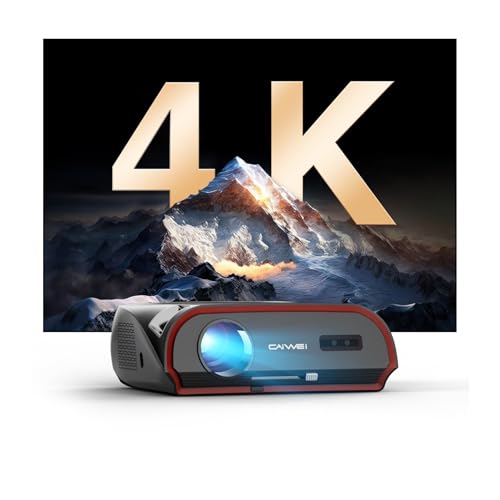
- ✓ Bright even during the day
- ✓ 4K HDR visuals
- ✓ Easy to install
- ✕ Slightly bulky design
- ✕ Sound could be richer
| Brightness | 1800 ANSI lumens with TS-LED technology |
| Resolution | 4K decoding with HDR10+ support |
| Contrast Ratio | 16,000:1 dynamic contrast |
| Projection Size | Up to 300 inches |
| Display Technology | DLP with diffuse reflection imaging |
| Connectivity | WiFi 6, HDMI 2.1 (60Hz), Bluetooth 5.2, Ethernet (RJ45) |
The moment I turned on the Daytime 4K Smart Projector, I was surprised by how bright the image looked even with the curtains open. It’s like stepping into a mini home cinema in broad daylight.
The 1800 ANSI lumens really do make a difference, especially when I projected onto the wall of my living room during the day.
The picture quality is impressive for a projector under $500. Thanks to the 4K decoding and HDR10+ support, everything from sports highlights to streaming shows pops with vibrant colors and deep blacks.
I especially enjoyed watching a recent blockbuster; the clarity and contrast felt surprisingly cinematic.
Setting it up was straightforward. The keystone correction and zoom features made it easy to align the image perfectly on my wall.
Plus, the flexible mounting options mean you can ceiling-mount or place it on a tripod without hassle.
The built-in Android TV 11 makes streaming a breeze. I connected to WiFi6, and the streaming was smooth, even with multiple apps open.
The dual 38W speakers delivered surprisingly rich sound, and I loved that I could connect my Bluetooth soundbar for an even more immersive experience.
Gaming was a delight thanks to the HDMI 2.1 port and 60Hz refresh rate. Fast-paced games looked sharp and felt fluid.
The projector’s low noise level and sealed optical engine kept distractions to a minimum, letting me focus on the game or movie.
Overall, this projector packs a lot into a compact, budget-friendly design. It’s perfect for daytime use, family movie nights, or even small outdoor setups.
It genuinely feels like a versatile, all-in-one entertainment hub at an affordable price.
Daylight Projector 4K HDR Home Theater, Smart Daytime Movie

- ✓ Bright enough for daytime use
- ✓ Vibrant, true-to-life colors
- ✓ Fast, automatic adjustments
- ✕ Not suitable for outdoor daylight
- ✕ Slightly limited speaker bass
| Brightness | 2200 ANSI lumens |
| Contrast Ratio | 23000:1 |
| Color Gamut | 30% wider than standard RGB |
| Projection Size and Throw Distance | 100-inch display from 9.18 feet |
| Display Technology | LCD with 6-color LED system |
| Connectivity | HDMI 2.1, USB 2.0, AV/VGA, 3.5mm audio, Bluetooth 5.4, dual-band Wi-Fi 6 (2.4G/5GHz) |
The moment I turned on the Daylight Projector 4K HDR Home Theater, I was immediately impressed by how bright the image was, even in a room with some ambient light. With 2200 ANSI lumens, it easily punches through daylight conditions, making it perfect for daytime movie marathons or gaming sessions without needing a dark room.
The 6-color LED system really stands out, providing richer, more natural colors than standard projectors. I noticed the deep reds and vibrant blues, which made everything from movies to gaming feel more immersive.
The contrast ratio of 23,000:1 created sharp shadows and bright highlights that added depth to every scene.
Setting up was a breeze thanks to the short-throw lens. I placed it just under 10 feet from the wall, and it projected a crisp 100-inch display without any distortion.
The auto-focus and keystone correction, powered by the 3-in-1 CMOS module, kicked in instantly, so I didn’t waste time fiddling with settings.
The built-in 38W speakers delivered surprisingly rich sound, filling my living room with clear, punchy audio. For true cinematic experience, I connected my Bluetooth headphones via Bluetooth 5.4, which was seamless and lag-free.
Navigation through the smart features was smooth thanks to Wi-Fi 6 and NFC casting. I streamed 4K content directly from my phone, with no lag or buffering.
The multiple ports, including HDMI 2.1 and USB, made connecting my game console and laptop straightforward.
The eye-care features, like blue light reduction and auto-brightness, really help reduce eye strain during longer viewing sessions. Overall, this projector feels like a compact, powerful home theater solution that beats many pricier options.
What Are the Key Features of a Golf Simulator Projector Under $500?
Brightness is another essential feature, as it determines how well the projector performs in various lighting conditions. Projectors with at least 2,500 lumens can deliver a bright enough image even in daylight, ensuring that you can enjoy your simulator without being hindered by a dim display.
The throw distance of a projector affects how far it needs to be from the screen to produce a clear image. Short-throw projectors are particularly beneficial in tight spaces, allowing you to set up your simulator without needing a large room.
Portability is vital for users who might want to move their golf simulator setup. A lightweight and compact projector is easier to transport and set up in different environments, making it convenient for both home and travel use.
Having various connectivity options ensures that you can easily connect the projector to different devices, enhancing versatility. HDMI and USB ports are standard and allow for seamless integration with computers or gaming consoles, which is essential for running golf simulation software.
Built-in speakers add convenience by providing audio without the need for additional equipment, simplifying setup and creating a more immersive experience. This feature is particularly useful for users who want a straightforward and efficient setup.
Finally, image correction features like keystone correction are important for ensuring that the projected image fits your screen correctly, especially if you are using a makeshift area for your simulator. These adjustments can prevent image distortion, allowing for a more enjoyable viewing experience.
How Do You Determine the Best Image Quality for Golf Simulators?
To determine the best image quality for golf simulators, several key factors need to be considered:
- Resolution: The resolution of a projector directly impacts the clarity of the image displayed. A higher resolution, such as 1080p, provides clearer and more detailed visuals, making it easier to read the course layout and ball flight data.
- Brightness: Measured in lumens, brightness is crucial for ensuring that the image remains clear and vibrant, even in well-lit environments. A projector with at least 3000 lumens is recommended for golf simulators to counteract ambient light.
- Contrast Ratio: The contrast ratio determines the difference between the darkest and lightest parts of the image. A higher contrast ratio enhances the depth and realism of the visuals, which is particularly important for simulating outdoor environments.
- Refresh Rate: A higher refresh rate ensures that motion appears smooth and fluid, which is essential for accurately displaying the fast action of golf swings and ball movement. Look for projectors with a refresh rate of at least 60Hz.
- Throw Distance: Understanding the throw distance is vital for setting up your projector correctly. A short-throw projector can display a large image from a short distance, which is ideal for smaller spaces often used for golf simulators.
- Connectivity Options: Ensure that the projector has multiple connectivity options, such as HDMI and VGA, to accommodate various devices. This flexibility allows for easy integration with computers and other gaming systems used in golf simulation.
- Image Size: The ability to project a large image size can enhance the immersive experience. A projector that can display an image size of 100 inches or more is preferable for a realistic simulation experience.
Which Projector Provides Optimal Brightness and Resolution for Indoor Use?
The best golf simulator projectors under $500 typically balance brightness, resolution, and features suitable for indoor use.
- Epson Home Cinema 760HD: A 720p resolution projector with 3,300 lumens of brightness.
- ViewSonic PA503W: A WXGA (1280×800) resolution projector offering 3,600 lumens for vivid images.
- BenQ MS536: A 720p projector with 3,600 lumens brightness, making it suitable for well-lit rooms.
- Acer H6531BD: A 1080p projector with 3,500 lumens brightness, providing great image quality for simulators.
Epson Home Cinema 760HD: This projector offers a solid option for golf simulation with its 720p resolution and high brightness level, ensuring clear images even in ambient light. The 3LCD technology allows for vibrant color reproduction, making your simulated golf experience more immersive.
ViewSonic PA503W: With a WXGA resolution, this model is designed for better clarity and detail in graphics, along with an impressive 3,600 lumens output. It features a long lamp life and good connectivity options, making it versatile for different setups in indoor spaces.
BenQ MS536: This projector is ideal for golf simulation due to its 720p resolution and high brightness of 3,600 lumens, which helps maintain image quality in various lighting conditions. The projector also supports a variety of input sources, making it easy to connect to different devices.
Acer H6531BD: Boasting a full HD 1080p resolution and 3,500 lumens brightness, this projector is perfect for creating detailed and bright images for golf simulations. It features a user-friendly setup process and offers multiple connectivity options, ensuring a hassle-free experience for users.
What User Experiences Are Reported with Budget Golf Simulator Projectors?
- Image Quality: Users frequently report that while some budget projectors offer decent image quality, they may struggle with brightness and clarity compared to higher-end models. This can lead to a less immersive experience, especially in well-lit environments.
- Ease of Setup: Many users appreciate that budget golf simulator projectors are generally easy to set up, with straightforward installation processes that allow for quick use. However, some models may lack comprehensive instructions or require additional adjustments for optimal performance.
- Portability: A common benefit noted by users is the lightweight and portable nature of budget projectors, making them convenient for moving between different locations. This can be a significant advantage for golfers who want to set up their simulators in various settings without hassle.
- Compatibility: Users often express satisfaction with the compatibility of budget projectors with various golf simulation software and hardware. However, there are reports of some projectors having limited connectivity options, which could restrict the overall gaming experience.
- Value for Money: Many users feel that budget projectors provide good value for the price, offering a satisfactory gaming experience without breaking the bank. Nonetheless, some users caution that spending just a bit more can significantly enhance performance and features.
- Durability: Experiences regarding durability vary, with some users noting that while budget projectors can be cost-effective, they may not withstand heavy use as well as more expensive options. Users are advised to consider long-term use when selecting a budget model.
- Customer Support: Users often mention differences in customer service experiences, with some brands providing excellent support while others may be less responsive. This can be an important factor for users who may encounter issues or require assistance with setup.
How Can You Set Up a Golf Simulator Projector Effectively?
Screen Type: The impact screen should be durable and designed to withstand the impact of golf balls. Look for screens that provide a high-quality reflection to enhance image clarity, as well as those that minimize the risk of tearing or damage from ball impacts. Some screens are also designed to be easily folded or stored when not in use.
Mounting Options: Proper mounting is essential for achieving the best projection angle and distance. If you opt for ceiling mounting, make sure to measure the throw distance accurately to avoid distortion. Wall mounts can be more flexible, allowing for adjustments based on room layout, but still require careful positioning to ensure optimal performance.
Lighting Control: Ambient light can significantly affect the quality of the projected image, so it’s advisable to use the simulator in a room that can be darkened. Heavy curtains, blackout shades, or even dedicated lighting setups can help create an ideal environment. This control over lighting will not only improve image quality but also contribute to a more immersive gaming experience.
Simulator Software: The software you choose will play a significant role in the quality of your simulation experience. Select software that offers a range of courses, practice modes, and swing analysis tools to enhance your training and enjoyment. Some programs are specifically optimized for use with certain projectors, so ensure compatibility before purchase.
Connectivity: The projector should have multiple connectivity options to accommodate different devices. HDMI is the most common connection type for modern projectors and computers, but ensure your projector also has USB ports or other inputs that may be necessary for your specific setup. This will allow for easy switching between various devices without the need for constant reconfiguration.
Audio Setup: A good audio setup can greatly enhance the realism of your simulator. Consider using a surround sound system or high-quality speakers that can simulate the sounds of a golf course, such as crowd noise, birds chirping, or the sound of a golf ball hitting the club. This immersive audio experience can make a significant difference in how engaging the simulator feels.
What Are the Advantages of Using a Golf Simulator Projector for Practicing Golf?
Using a golf simulator projector for practicing golf offers numerous advantages, especially for those looking to enhance their game indoors.
- Realistic Experience: A golf simulator projector provides a highly immersive experience by projecting life-like graphics of golf courses and terrains. This realism helps players visualize their shots more accurately, making practice sessions more effective.
- Convenience: Practicing with a projector allows golfers to play anytime without the need to travel to a physical course. This convenience is particularly beneficial for those with busy schedules or limited access to outdoor golf facilities.
- Data Tracking: Many golf simulator projectors come equipped with advanced technology that tracks various performance metrics such as swing speed, ball speed, and launch angle. This data helps players analyze their performance and identify areas for improvement.
- Customizable Settings: A projector can simulate different weather conditions and course difficulties, allowing players to practice in a variety of scenarios. This customization enhances skill development by challenging golfers to adapt to new situations.
- Space Saving: Unlike traditional golf simulators that might require significant space, a projector can be set up in smaller areas. This makes it an ideal option for home use, allowing golfers to practice without needing a dedicated room.
- Affordability: Many quality golf simulator projectors are available for under $500, making them an accessible option for amateur golfers. This affordability allows more players to invest in their practice without breaking the bank.