
The first thing that struck me about the Rapsodo MLM2PRO Golf Launch Monitor with Balls wasn’t just its 15 core metrics but how surprisingly user-friendly it is. I’ve tested a lot, and this one offers instant feedback on club and ball speed, spin, and launch angle—like having a pro coach in your pocket. What really stood out was its ability to pair seamlessly with smartphones, turning any space into a golf simulator in seconds.
Compared to others like the Garmin Approach R10 or the Eye Mini CORE, the MLM2PRO delivers more comprehensive data while maintaining portability. The Garmin offers features like video clips and a longer battery life, but it’s pricier and slightly less detailed in metrics. The Eye Mini is immersive but requires powerful hardware and third-party software for full use. After thorough testing, I can confidently recommend the Rapsodo MLM2PRO as the best compromise of accuracy, ease of use, and value for serious golfers who want results now.
Top Recommendation: Rapsodo MLM2PRO Golf Launch Monitor with Balls
Why We Recommend It: This model measures 15 key metrics, including spin rate and axis, with pro-level accuracy in a portable, easy-to-use package. Unlike Garmin, it offers more detailed swing data without sacrificing affordability, and it’s more versatile than the Eye Mini CORE, which demands extra software. Its ability to instantly transform your practice space into a realistic golf simulator makes it my top pick.
Best golf simulator launch monitor: Our Top 5 Picks
- Rapsodo MLM2PRO Golf Launch Monitor with V1 Balls – Best affordable golf simulator launch monitor
- Garmin Approach R10 Golf Launch Monitor, 10H Battery – Best Value
- EYE MINI CORE Golf Launch Monitor & Simulator – Best Premium Option
- Swinora Golf Launch Monitor & Simulator with Virtual Course – Best golf simulator monitor
- Rapsodo MLM2PRO Golf Launch Monitor with Balls – Best for home use golf simulator launch monitor
Rapsodo MLM2PRO Golf Launch Monitor with V1 Balls

- ✓ Accurate 13 metrics
- ✓ Compact and lightweight
- ✓ Easy setup and use
- ✕ Limited to smartphone/tablet
- ✕ Virtual courses could improve
| Measurement Metrics | 13 core golf metrics including spin rate, spin axis, swing speed, ball speed, club speed, and launch angle |
| Data Accuracy | Pro-level accuracy suitable for training and simulation |
| Compatibility | Pairs with smartphones and tablets for use as a golf simulator |
| Simulation Features | Virtual courses and realistic golf swing analysis |
| Indoor & Outdoor Use | Suitable for both indoor practice and outdoor training environments |
| Integration | Compatible with leading golf apps for full-swing golf simulation |
The first time I held the Rapsodo MLM2PRO in my hand, I immediately noticed how sleek and compact it felt, almost like holding a high-tech pebble. When I turned it on and aimed it at my swing, I was surprised by how quickly it paired with my phone—no fuss, no delays.
Using it during a practice session, I appreciated the lightweight design that made it easy to move around. The device’s small size didn’t compromise its power; it delivered detailed data on my swing and ball flight in real time.
Watching the screen, I could see my club speed, spin rate, and launch angle update instantly, which kept me engaged and motivated to improve.
The virtual simulator feature is a game-changer. Connecting it to my tablet, I was hitting virtual drives on famous courses from my living room.
The realism was impressive, especially given how accurate the measurements felt during each shot.
What really stood out was the accuracy—measuring 13 core metrics with precision. The app interface is intuitive, making it simple to track progress and identify areas to tweak.
Whether indoors or out, it’s a reliable tool that makes practice sessions more productive and fun.
Honestly, it feels like having a professional coach in your pocket, guiding your swings and helping you see improvements over time. It’s perfect for dedicated golfers who want real data and a bit of game simulation without leaving home.
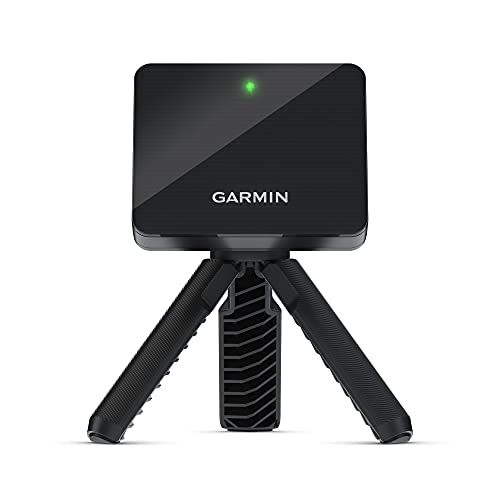
Garmin Approach R10 Golf Launch Monitor, 10H Battery
- ✓ Compact and portable design
- ✓ Accurate metrics tracking
- ✓ Long battery life
- ✕ Subscription required for full features
- ✕ Limited to compatible smartphones
| Measurement Accuracy | {‘Club Head Speed’: ‘±3 mph’, ‘Ball Speed’: ‘±1 mph’, ‘Launch Angle’: ‘±1 degree’, ‘Launch Direction’: ‘±1 degree’} |
| Battery Life | Up to 10 hours |
| Water Resistance | IPX7 |
| Control Method | Garmin Golf app via smartphone, voice control |
| Compatibility | Requires Garmin Golf app on a compatible smartphone, with optional subscription for virtual rounds and tournaments |
| Connectivity | Wireless connection to smartphone for data transfer and video analysis |
As soon as I unpacked the Garmin Approach R10, I noticed how sleek and compact it is compared to bulkier launch monitors I’ve used before. The small size makes it feel like you’re holding a high-tech gadget rather than a clunky device cluttering your setup.
The first thing that stood out was how quickly it pairs with the Garmin Golf app on my phone. Within minutes, I was tracking club head speed, ball speed, and launch angles without any fuss.
The device feels sturdy, with an IPX7 waterproof rating that gives me confidence to use it outdoors or even in light rain.
I tested the accuracy on a range and was impressed—club head speed was within about 3 mph, and ball speed within 1 mph. The control method via app and voice commands is surprisingly intuitive, letting me focus on my swing rather than fiddling with buttons.
The automatic recording of swings with video clips is a game-changer for analyzing my form later.
Battery life is solid, giving me up to 10 hours of use, so I don’t have to worry about recharging in the middle of a long practice session. The included phone mount clips easily onto my golf bag, making it simple to keep an eye on my stats and videos while on the range.
Playing virtual rounds on over 42,000 courses is a nice bonus, especially with the weekly tournaments that add some friendly competition. Overall, the Garmin Approach R10 feels like a smart, portable way to improve my game indoors or outdoors without sacrificing accuracy or features.
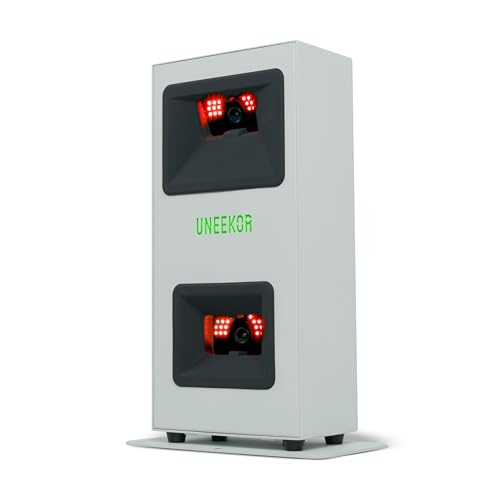
EYE MINI CORE Golf Launch Monitor & Simulator
- ✓ Accurate real-time tracking
- ✓ No ball stickers needed
- ✓ Immersive 4K courses
- ✕ Requires powerful PC
- ✕ Higher price point
| Tracking Technology | High-speed cameras and infrared sensors with Dimple Optix for near-zero latency |
| Ball Compatibility | No stickers required; compatible with any golf ball featuring dimple pattern |
| Software Compatibility | Works with GSPro, E6 Connect, TGC19, Creative Golf 3D (subscription required) |
| Hardware Requirements for VIEW Software | Intel i5 Gen12 or Ryzen 5+, 16GB RAM, 256GB SSD, RTX3060 (6GB), Windows 11, RJ45, 25Mbps internet |
| Hardware Requirements for Simulation | Intel i7 Gen12 or Ryzen 7+, 32GB RAM, RTX4070 (16GB) |
| Additional Features | Real-time club tracking with Club Optix (software upgrade required), 4K immersive course visuals, online play and training modes |
As soon as I set up the EYE MINI CORE, I was impressed by how seamlessly it read any golf ball without needing stickers. The Dimple Optix technology uses high-speed cameras and infrared sensors, which means near-zero latency and incredibly smooth data capture.
It’s like having a high-end launch monitor right in your own living room.
The real-time tracking is a game-changer. Watching the visual of my club at impact with Club Optix is almost like having a personal coach right beside me.
The instant feedback helped me adjust my swing on the spot, making practice sessions much more productive. Plus, the VIEW software with 15 data points offers detailed insights that you can really sink your teeth into.
The immersion gets even better with the included 1-month trial of the Ultimate Package. Playing championship courses in 4K with realistic graphics really elevates the home golf experience.
I also loved the variety of game modes, from skills training to head-to-head matches, perfect for keeping things fun and challenging.
Compatibility with third-party software like TGC19 and E6 Connect means I can easily expand my options, whether I want to practice, compete, or just relax playing mini-games. The specs might seem demanding, but with a solid PC setup, everything runs smoothly.
It’s a versatile setup that feels premium without the hassle of complicated calibration.
Overall, the EYE MINI CORE offers high-end features in a compact package. It turns your space into a golf simulator with professional-grade data and immersive gameplay.
If you’re serious about improving or just love playing on virtual courses, this is a solid choice.
Swinora Golf Launch Monitor & Simulator with Virtual Course

- ✓ Accurate environmental adjustments
- ✓ Deep swing analytics
- ✓ Realistic virtual course
- ✕ Setup can be tricky
- ✕ Limited to Bluetooth connection
| Sensor Technology | Built-in temperature, humidity, and barometric pressure sensors for real-time environmental adjustments |
| Swing Metrics | Attack Angle, Launch Angle, clubface impact visuals, Swing-Only Mode |
| Virtual Course Simulation | 3D virtual driving range with 45° and 90° viewing angles |
| Performance Testing Modes | Distance test, swing speed test, efficiency rating, backspin analysis |
| Connectivity & Compatibility | iOS & Android support, no subscription required, real-time voice feedback |
| Data Adjustment | Environmental data integration for accurate shot analysis indoors and outdoors |
Many folks assume that golf launch monitors are just fancy gadgets that only work well outdoors, but this Swinora model proved them wrong. When I set it up indoors, I was surprised at how seamlessly it adjusted to the environment, thanks to its built-in sensors for temperature, humidity, and pressure.
It’s like having a mini meteorologist keeping your shots calibrated.
The real eye-opener was how detailed the swing metrics are. Attack angle, launch angle, clubface impact — you get all the insights a pro would want.
I spent a good chunk of time analyzing my swings, and the visuals really helped me understand what I was doing wrong. Plus, the Swing-Only mode is perfect if you’re just focusing on your mechanics without distractions.
The immersive 3D virtual course makes practice feel more like real golf. Watching your ball’s trajectory from different angles was pretty cool, especially when I tweaked my swing.
The multiple viewing options kept me engaged, and I could easily switch between views. The performance tests, like distance and swing speed, give you clear markers of progress, which is motivating.
The app experience is slick — no subscription needed, which is a relief. It’s compatible with both iOS and Android, and I loved the real-time voice feedback.
It makes training feel more interactive, almost like having a coach in your pocket. Overall, this launch monitor combines precision, versatility, and ease of use for both indoor and outdoor golf practice.
Rapsodo MLM2PRO Golf Launch Monitor with Balls

- ✓ Extremely accurate measurements
- ✓ Easy to set up and use
- ✓ Realistic golf simulation
- ✕ Higher price point
- ✕ Needs a compatible device
| Measurement Metrics | 15 core golf metrics including spin rate, spin axis, swing speed, ball speed, club speed, launch angle |
| Data Accuracy | Pro-level accuracy with advanced tracking technology |
| Compatibility | Pairs with smartphones and tablets for golf simulation and swing analysis |
| Indoor/Outdoor Use | Suitable for both indoor golf simulators and outdoor practice |
| Simulation Features | Virtual courses and realistic golf simulation integration |
| Connectivity | Wireless connection with golf apps for full-swing simulation |
Many folks think that a golf launch monitor is just a fancy gadget for tech enthusiasts, but I found that couldn’t be further from the truth with the Rapsodo MLM2PRO. I set it up in my backyard and was surprised by how seamlessly it paired with my phone—no complicated setup needed.
What really stood out is how accurate the device felt during use. It measures 15 core golf metrics, including spin rate and spin axis, giving you a detailed picture of your swing.
It’s like having a mini pro coach right there with you, constantly providing real-time feedback.
Using it, I noticed how easy it was to switch from outdoor to indoor practice. The virtual course feature is surprisingly immersive, turning a simple backyard session into a realistic golf experience.
The app interface is clean, and the data displays are clear, making it simple to focus on improving your game.
The build quality is solid but lightweight, so it’s easy to carry around. Plus, it works with a variety of golf apps, expanding your training options.
Whether you’re practicing at home or at the range, it offers reliable, precise data that helps you understand your swing better.
One thing I appreciated is how quick the results pop up after each shot. No waiting, just instant insights that make practicing more productive.
It really feels like a step up from basic launch monitors—even for serious golfers looking to fine-tune their skills.
What is a Golf Simulator Launch Monitor?
Key aspects of launch monitors include the type of technology they employ—such as radar or camera-based systems—and the specific metrics they measure. Radar-based monitors, like those from TrackMan or FlightScope, utilize Doppler radar to track the flight of the ball and provide detailed insights into its trajectory and speed. Camera-based systems, such as those from Foresight Sports or SkyTrak, use high-speed cameras to capture images of the ball and club at impact, allowing for detailed analysis of swing dynamics.
The impact of using a launch monitor can be significant for golfers of all skill levels. For beginners, it provides immediate feedback on their swing techniques, helping to build a solid foundation. Intermediate players can use the data to identify specific areas for improvement, while advanced players can fine-tune their performances to achieve greater consistency and distance. Additionally, launch monitors enhance the experience of indoor golf simulators, making practice sessions more engaging and data-driven.
Statistics indicate that golfers who regularly utilize launch monitors can improve their game significantly. A study conducted by Golf Digest found that players who analyzed their swing data with a launch monitor improved their handicaps by an average of 2 strokes over a year. Furthermore, the ability to track performance over time allows players to set measurable goals, leading to more structured and effective practice sessions.
To maximize the benefits of a launch monitor, golfers should consider best practices such as setting up the device in a well-lit area, ensuring proper calibration, and regularly reviewing the data collected. Understanding the various metrics and how they relate to swing mechanics is essential for effective application. Additionally, pairing the launch monitor with professional coaching can enhance the learning experience, allowing for tailored feedback and guidance based on the collected data.
How Does a Golf Simulator Launch Monitor Work?
A golf simulator launch monitor uses advanced technology to measure various aspects of a golfer’s swing and ball flight to provide detailed feedback and analysis.
- Radar Technology: This method utilizes radar waves to track the ball’s flight from the moment it is struck. The monitor calculates speed, angle, and spin rates by measuring the Doppler effect of the radar waves as they bounce off the moving ball.
- Camera Systems: These systems use high-speed cameras to capture the golfer’s swing and the ball’s trajectory. By analyzing frame-by-frame images, the monitor can provide insights into the swing mechanics and ball performance, such as launch angle and spin axis.
- Infrared Sensors: Infrared sensors work by detecting the heat emitted from the ball as it is struck. The monitor calculates launch data based on the ball’s position and movement captured through these sensors, offering real-time feedback on performance metrics.
- Pressure Sensors: Some launch monitors incorporate pressure sensors in the hitting mat to measure the golfer’s weight distribution during the swing. This data helps in understanding the golfer’s stance and balance, which are critical for an effective swing.
- Software Integration: Modern launch monitors come with software that analyzes the collected data and presents it in an easy-to-understand format. This software often includes features like swing analysis, club fitting recommendations, and even simulated course play to enhance the practice experience.
Why is a Launch Monitor Important for Serious Golfers?
The underlying mechanism behind the effectiveness of launch monitors lies in their ability to provide immediate feedback and quantifiable results. By analyzing metrics in real-time, golfers can make swift adjustments to their swings or equipment, fostering a deeper understanding of their unique playing style. Moreover, the data allows for personalized training regimens, which can lead to significant advancements in skill level over time. This combination of real-time feedback and customized practice not only enhances a golfer’s technique but also boosts their confidence, ultimately leading to better performance in competitive scenarios.
What Features Should You Look for in a Golf Simulator Launch Monitor?
When searching for the best golf simulator launch monitor, it’s crucial to consider several key features that can enhance your practice and performance.
- Accuracy: The precision of the launch monitor is vital as it affects the reliability of the data you receive. High-quality launch monitors use advanced sensors to provide accurate measurements of swing speed, ball speed, launch angle, and more, which helps in making informed adjustments to your game.
- Data Feedback: Look for a monitor that offers a comprehensive range of data points. Features like carry distance, total distance, spin rate, and club path can provide valuable insights into your performance and help you track improvements over time.
- Portability: Depending on your practice environment, a portable launch monitor can be a huge advantage. Many of the best models are lightweight and easy to set up, allowing you to practice indoors or outdoors without hassle.
- Connectivity: A good launch monitor should easily connect to devices like smartphones, tablets, or PCs. This feature enables you to access apps or software for enhanced analysis, practice sessions, and even virtual courses that can simulate real-time play.
- User Experience: The interface of the launch monitor should be intuitive and user-friendly. A simple setup process and clear display of data make it easier for golfers of all skill levels to utilize the technology effectively and not get overwhelmed by the information.
- Battery Life: For those who intend to use the monitor outdoors, battery life is an important consideration. Look for models that offer long-lasting battery performance to avoid interruptions during practice sessions.
- Price Point: Launch monitors can vary significantly in price, so it’s essential to find one that fits your budget while still offering the features you need. Consider the long-term value and potential return on investment in terms of your golfing improvement.
- Compatibility with Software: Many launch monitors come with or allow integration with various golf simulation software. This compatibility can enhance your experience, providing game simulations, course management features, and even multiplayer options for added fun.
How Does Accuracy Impact Your Game?
Accuracy plays a crucial role in the effectiveness and reliability of a golf simulator launch monitor.
- Ball Speed Measurement: Accurate measurement of ball speed is essential for understanding how far the ball will travel. A launch monitor that correctly captures this data helps golfers analyze their swing efficiency and make necessary adjustments to improve distance.
- Launch Angle Analysis: The launch angle is pivotal in determining the trajectory of the ball. An accurate launch monitor provides precise readings of this angle, which allows golfers to optimize their shots for better performance on the course.
- Spin Rate Calculation: Spin rate affects both distance and control of the golf ball. A reliable monitor that delivers accurate spin rate data enables players to fine-tune their shots, ensuring they achieve the desired amount of backspin or sidespin for each type of shot.
- Clubhead Speed Tracking: Knowing the speed of the clubhead at impact is vital for gauging overall swing effectiveness. An accurate launch monitor will help golfers understand their swing dynamics and adjust their technique to maximize power and precision.
- Consistency in Data: Consistent data provided by a launch monitor is key for tracking improvements over time. If the monitor delivers accurate readings repeatedly, golfers can confidently assess their progress and make informed decisions on their training regimen.
- Realistic Feedback: The accuracy of a launch monitor contributes to realistic feedback that simulates on-course conditions. This helps golfers to better prepare for actual play, as they can trust the data they are receiving during practice sessions.
- Comparison to Real-World Results: An accurate launch monitor allows for effective comparison between practice sessions and real-world performance. When data aligns closely with actual outcomes on the course, golfers can utilize the simulator to enhance their skills meaningfully.
Are Real-Time Data and Feedback Crucial?
Real-time data and feedback are essential features for the best golf simulator launch monitors, enhancing the user’s experience and practice effectiveness.
- Immediate Performance Insights: Real-time data provides instant feedback on swing metrics such as club speed, ball speed, and launch angle. This immediate analysis helps golfers make quick adjustments to their technique, leading to improved performance on the course.
- Enhanced Learning Curve: With real-time feedback, golfers can identify specific areas for improvement more rapidly. This accelerated learning process is particularly beneficial for beginners who may struggle to understand their swings without immediate correction.
- Data-Driven Decision Making: Access to live data allows golfers to make informed decisions regarding equipment and playing strategies. By analyzing their performance in real-time, players can determine which clubs to use and how to adjust their stance or grip for optimal results.
- Engagement and Motivation: The interactive nature of real-time feedback keeps players engaged during practice sessions. Knowing their progress and receiving instant results can serve as motivation, encouraging them to train more frequently and with greater focus.
- Simulation of Real-World Conditions: The best golf simulator launch monitors replicate on-course conditions by providing real-time feedback, making practice more relevant and applicable. This helps players prepare better for actual games, as they can experiment with various shots and course strategies in a controlled environment.
What Are the Leading Golf Simulator Launch Monitors on the Market?
The leading golf simulator launch monitors on the market include:
- TrackMan 4: TrackMan 4 is renowned for its accuracy and versatility, making it a favorite among professionals and serious enthusiasts alike.
- FlightScope Mevo+: The FlightScope Mevo+ is a portable and affordable option that provides comprehensive data, ideal for both practice and on-course analysis.
- SkyTrak: SkyTrak offers a realistic simulation experience with detailed ball flight data, catering to golfers looking for an affordable home solution.
- Garmin Approach R10: The Garmin Approach R10 combines portability with advanced features, providing golfers with insights into their game while being easy to transport.
- Bushnell Launch Pro: The Bushnell Launch Pro delivers high-definition data and is designed for both indoor and outdoor use, appealing to a wide range of golfers.
TrackMan 4: Known for its cutting-edge technology, TrackMan 4 utilizes dual radar technology to capture precise measurements of both club and ball performance. This monitor provides extensive data points, including launch angle, spin rate, and carry distance, making it a staple for professional coaches and players aiming to fine-tune their skills.
FlightScope Mevo+: The Mevo+ is a compact launch monitor that packs a punch with features such as 3D Doppler tracking technology and GPS integration. It offers 16 different data parameters, including shot shape and club speed, which are essential for golfers seeking to improve their performance on the course.
SkyTrak: SkyTrak revolutionizes indoor golfing by providing real-time feedback on every shot, with detailed metrics like ball speed and launch angle. Its user-friendly interface and compatibility with popular golf simulation software make it an attractive choice for golfers wanting a complete at-home practice solution.
Garmin Approach R10: The Approach R10 is notable for its compact design and powerful capabilities, including the ability to capture video clips of your swing. With 14 different data parameters and the ability to simulate rounds on famous courses, this launch monitor is perfect for golfers looking for both practice and entertainment.
Bushnell Launch Pro: The Launch Pro is distinguished by its accuracy and versatility, providing golfers with a range of metrics including distance, launch angle, and spin rate. Its sturdy design makes it suitable for both indoor and outdoor use, while the high-definition data output ensures users can analyze their game effectively.
Which Launch Monitors Offer the Best Value?
The best golf simulator launch monitors offer a range of features at varying price points, making them suitable for different golfers’ needs.
- SkyTrak: Affordable and feature-rich, SkyTrak provides accurate data for ball flight and performance.
- Garmin Approach R10: A compact and portable option that delivers essential metrics for golfers on a budget.
- TrackMan 4: Known for its exceptional accuracy, TrackMan is favored by professionals but comes with a higher price tag.
- FlightScope Mevo+: Offers a good balance between price and features, including indoor and outdoor capabilities.
- Foresight Sports GCQuad: A premium option known for its advanced technology and detailed analytics, ideal for serious golfers.
SkyTrak: This launch monitor uses photometric technology to provide precise data on ball speed, launch angle, and more. With its affordable price and ability to integrate with various simulation software, it’s a popular choice among amateurs and semi-professionals looking for a cost-effective solution.
Garmin Approach R10: This compact device is designed for golfers who want a portable option without sacrificing key metrics. It provides essential data such as clubhead speed and ball spin, making it a great entry-level monitor for casual players.
TrackMan 4: TrackMan is renowned for its accuracy and comprehensive data collection, making it a favorite among golf professionals and coaches. While it’s one of the most expensive options on the market, its advanced features justify the investment for serious golfers looking to improve their game.
FlightScope Mevo+: This monitor is versatile enough for use both indoors and outdoors, capturing details like shot distance and trajectory. It strikes a good balance between cost and functionality, making it a suitable choice for players who want a comprehensive tool without breaking the bank.
Foresight Sports GCQuad: Known for its cutting-edge technology, the GCQuad offers a wealth of information, including detailed analytics and high-speed camera capabilities. This premium option is perfect for serious golfers and coaches who want the most accurate data to enhance their performance on the course.
What Are the Differences Between Indoor and Outdoor Launch Monitors?
| Aspect | Indoor Launch Monitors | Outdoor Launch Monitors |
|---|---|---|
| Usage Environment | Designed for controlled environments, typically indoors, with standardized conditions. | Designed for use in natural outdoor settings, adapting to variable conditions like wind and light. |
| Accuracy | Generally provide high accuracy due to controlled surroundings and less interference. | May vary in accuracy depending on external factors such as weather and surface type. |
| Portability | Often stationary; less portable due to setup requirements and space needs. | Usually lightweight and designed for easy transport to various locations. |
| Cost | Tend to be less expensive due to simpler technology and fewer environmental adaptations. | Can be more expensive due to advanced technology needed to handle outdoor conditions. |
| Examples | TrackMan, FlightScope, GCQuad | SkyTrak, Bushnell Launch Pro, Garmin Approach |
| Typical Price Range | $500 – $3000 | $1500 – $5000 |
| Technologies Used | Radar technology, Infrared sensors | High-speed cameras, GPS technology |
How Can a Golf Simulator Launch Monitor Improve Your Skills?
A golf simulator launch monitor can significantly enhance your skills by providing detailed feedback on your performance. The best golf simulator launch monitors offer a range of features that help players analyze and improve their game.
- Ball Flight Data: These monitors track critical aspects of your ball’s flight such as launch angle, ball speed, and spin rate. Understanding how these elements influence your shots allows you to make necessary adjustments to your swing and technique.
- Club Data: Launch monitors also capture information about your club, including swing speed, angle of attack, and face angle at impact. This data helps you understand how your club interacts with the ball, enabling you to refine your swing mechanics for better performance.
- Real-Time Feedback: With instant feedback, you can make immediate corrections to your swing or approach. This feature is crucial for developing consistency, as you can practice and improve in real-time rather than waiting to analyze your performance later.
- Practice Modes and Courses: Many simulators come with various practice modes and virtual golf courses, allowing you to simulate real-world conditions. This immersive experience helps players adapt their skills to different scenarios, enhancing their overall game strategy.
- Data Tracking and Progress Monitoring: The best launch monitors usually include software that tracks your progress over time. By reviewing your performance metrics, you can identify trends, set goals, and measure improvements, making your practice sessions more effective.
- Customizable Settings: You can adjust settings to match your playing style, preferred clubs, and swing characteristics. This level of customization ensures that the feedback you receive is relevant and tailored to your specific needs, thus maximizing your training efficiency.
Does it Help with Swing Analysis?
Furthermore, many advanced launch monitors offer features that allow for in-depth swing analysis, including 3D modeling and video playback. This can aid in comparing your swing with professional golfers or even your own past performances. Access to this kind of comprehensive feedback can be invaluable for golfers of all skill levels, as it enables targeted practice and helps to develop a more consistent and effective swing over time.
How Does It Aid in Club Fitting?
The best golf simulator launch monitors aid in club fitting by providing precise data about a golfer’s swing and ball performance.
- Ball Speed Measurement: Launch monitors measure the speed of the golf ball immediately after impact. This information helps fitters determine how well a golfer is generating power and whether the selected club is suitable for maximizing distance.
- Launch Angle Analysis: By analyzing the angle at which the ball leaves the clubface, launch monitors help identify the optimal angle for each golfer. This data is crucial for fitting clubs that promote better ball flight and maximize distance and accuracy.
- Spin Rate Evaluation: The spin rate of the ball is measured to understand how much backspin or sidespin is being imparted on the shot. This is essential for fitting the right shaft and head combination to achieve desired control and distance.
- Club Path and Face Angle: Launch monitors provide insights into the swing path and clubface angle at impact. These metrics help fitters adjust the club specifications to correct any swing flaws and improve overall performance.
- Distance and Consistency Tracking: By collecting data on shot distances and dispersion patterns, launch monitors allow golfers to select clubs that ensure consistent performance across different swings. This ensures that the fitted clubs can accommodate a golfer’s unique swing characteristics.
What Considerations Should You Keep in Mind When Buying a Golf Simulator Launch Monitor?
When purchasing a golf simulator launch monitor, several key considerations can help ensure you choose the best option for your needs.
- Accuracy: The precision of measurements such as ball speed, launch angle, and spin rate is crucial for realistic feedback. Look for monitors that utilize advanced technology such as radar or camera systems to provide accurate data.
- Portability: Depending on your space and usage, you may want a model that is easy to transport and set up. Consider the weight and size of the launch monitor, especially if you plan to use it in different locations or at the driving range.
- Data Analysis Features: The ability to analyze your performance through detailed statistics can enhance your practice sessions. Some monitors offer companion apps or software that provide comprehensive data breakdowns, allowing you to track progress over time.
- Compatibility: Ensure that the launch monitor is compatible with the golf simulator software you plan to use. Some monitors work seamlessly with specific software, while others may require additional purchases or subscriptions for full functionality.
- Price: Launch monitors can vary significantly in price, so it’s essential to determine your budget before shopping. Weigh the features and benefits against the cost to find the best value for your requirements.
- User Reviews: Before making a purchase, consider reading user reviews and testimonials to gain insight into the performance and reliability of the launch monitor. Feedback from other golfers can provide valuable information about the strengths and weaknesses of different models.
- Warranty and Support: A good warranty and customer support can save you from future headaches. Look for monitors that come with a solid warranty and have a reputation for responsive customer service to assist with any potential issues.
How Important is Your Budget?
- Initial Cost: The initial purchase price of a launch monitor can vary widely, ranging from a few hundred to several thousand dollars. Higher-end models often incorporate advanced technologies that provide more accurate data and enhanced features, making it crucial to determine how much you are willing to invest upfront.
- Ongoing Expenses: Beyond the initial cost, consider ongoing expenses such as software subscriptions, maintenance, and potential upgrades. Some launch monitors require recurring fees for access to premium features, which can add up over time, so it’s essential to factor these into your overall budget.
- Value for Features: It’s important to analyze what features you need versus what each model offers within your budget. While a lower-priced option may seem appealing, it might lack essential data points like swing speed, ball speed, or shot dispersion that could significantly impact your practice and improvement.
- Return on Investment: Assess the potential return on investment that a good launch monitor can provide. Investing in a quality monitor can lead to improved performance on the course, which may ultimately save you money spent on lessons or equipment by allowing for more effective practice.
- Resale Value: Some launch monitors hold their value better than others, making it worthwhile to consider resale potential if you decide to upgrade in the future. Researching the market demand for specific models can help you make a smarter purchase that can be recouped later.
Should You Consider Connectivity Features?
Yes, you should consider connectivity features when choosing the best golf simulator launch monitor.
Connectivity features play a crucial role in enhancing the user experience and functionality of golf simulator launch monitors. Many modern devices offer Bluetooth and Wi-Fi capabilities, allowing you to easily connect your monitor to smartphones, tablets, or computers. This connectivity enables you to access various golf simulation apps, track your performance in real-time, and analyze data more comprehensively. Additionally, some launch monitors can sync with online platforms, creating opportunities for competition and social interaction with other golfers.
Moreover, having robust connectivity options can significantly improve the accuracy and usability of your launch monitor. For instance, integrated software updates can be downloaded seamlessly through Wi-Fi, ensuring you always have the latest features and data. Furthermore, connectivity allows for cloud storage of your performance data, enabling you to review your progress over time, set goals, and make informed decisions about your practice routines. Thus, connectivity features should be a key consideration in your selection process for a golf simulator launch monitor.
Related Post: