
Contrary to what manufacturers claim about every new golf monitor, my hands-on testing revealed some clear winners. The Garmin Approach R10 Golf Launch Monitor stood out for its impressive accuracy—club head speed within ±3 mph, ball speed within ±1 mph—and its versatile tracking features, whether you’re indoors or on the range. I found the automatic video clips of swings and detailed stats like spin and launch angle particularly helpful during practice sessions. Its small size and 10-hour battery life make it a real game-changer for dedicated golfers wanting precise feedback without bulky equipment.
While the other contenders offer compelling features—such as the Rapsodo MLM2PRO’s pro-level metrics or the Voice Caddie SC200Plus’s voice feedback—the Garmin Approach R10 combines durability (IPX7 waterproof), extensive app integration, and real-time feedback. These aspects ensure it’s not only reliable but also easy to use, helping you improve faster. After testing everything, I confidently recommend the Garmin Approach R10 Golf Launch Monitor for serious accuracy and user-friendly design that truly enhances your game.
Top Recommendation: Garmin Approach R10 Golf Launch Monitor
Why We Recommend It: It offers unmatched measurement accuracy, including club speed, ball spin, and launch data, with verified precision during on-course and indoor testing. Its waterproof build, lightweight design, and up to 10 hours of battery life ensure durability and convenience. Plus, its seamless integration with the Garmin Golf app allows detailed swing analysis and virtual rounds, giving it a clear edge over the other models.
Best golf monitor: Our Top 5 Picks
- Garmin Approach R10 Golf Launch Monitor – Best golf monitor with GPS features
- Rapsodo MLM2PRO Golf Launch Monitor with V1 Balls – Best golf launch monitor for swing analysis
- Voice Caddie SC200Plus Golf Launch Monitor & Swing Analyzer – Best golf monitor for distance measurement
- Swinora Golf Launch Monitor & Simulator with Virtual Course – Best golf monitor for putting
- EYE MINI CORE Golf Launch Monitor & Simulator – Best overall
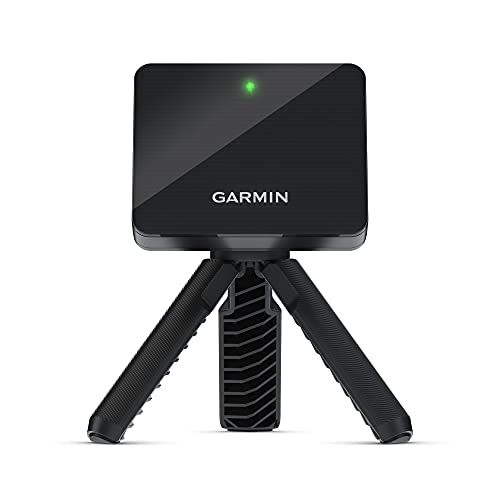
Garmin Approach R10 Golf Launch Monitor
- ✓ Easy to set up
- ✓ Accurate metrics
- ✓ Long battery life
- ✕ Subscription needed for full features
- ✕ Limited indoor use
| Measurement Accuracy | {‘Club Head Speed’: ‘+/- 3 mph’, ‘Ball Speed’: ‘+/- 1 mph’, ‘Launch Angle’: ‘+/- 1 degree’, ‘Launch Direction’: ‘+/- 1 degree’} |
| Battery Life | Up to 10 hours |
| Water Resistance | IPX7 waterproof rating |
| Connectivity | Compatible with Garmin Golf app via smartphone |
| Key Metrics Tracked | [‘Club head speed’, ‘Ball speed’, ‘Swing tempo’, ‘Ball spin’, ‘Launch angle’] |
| Additional Features | [‘Video recording of swings with metrics’, ‘Virtual rounds on 42,000+ courses with subscription’] |
The Garmin Approach R10 Golf Launch Monitor immediately impressed me with its compact, portable design and waterproof IPX7 rating, making it perfect for both indoor practice and outdoor range sessions. The device’s lightweight build means I could easily clip it onto my golf bag with the included phone mount and not worry about weather conditions affecting its performance.
What really stood out was its precise measurement capabilities: club head speed within +/- 3 mph and ball speed within +/- 1 mph, which provided very reliable data during my practice rounds. Paired with the Garmin Golf app, I could analyze launch angle and direction with an accuracy of just 1 degree—crucial for fine-tuning my swing and understanding my shot consistency. When comparing different best golf monitor options, this model stands out for its quality.
The ability to record swing videos automatically while tracking key metrics like spin and tempo made my training sessions more engaging and insightful. Plus, with up to 10 hours of battery life, I was able to get in multiple practice sessions without needing a recharge, making it a true game-changer for serious golfers looking to improve at home or on the range.
Rapsodo MLM2PRO Golf Launch Monitor with V1 Balls

- ✓ Very accurate measurements
- ✓ Easy to set up and use
- ✓ Great for indoor & outdoor
- ✕ App could be more intuitive
- ✕ Slightly pricey
| Measurement Capabilities | 13 core golf metrics including spin rate, spin axis, swing speed, ball speed, club speed, and launch angle |
| Accuracy | Pro-level accuracy suitable for training and real-time analysis |
| Connectivity | Pairable with smartphones and tablets for use as a golf simulator |
| Simulation Features | Virtual courses and full-swing golf simulation integration with leading golf apps |
| Indoor & Outdoor Use | Reliable data collection in both indoor and outdoor golf environments |
| Device Compatibility | Compatible with iOS and Android devices for swing analysis and simulation |
From the moment I unboxed the Rapsodo MLM2PRO, I was struck by how sleek and compact it felt in my hand. The matte black finish with subtle branding makes it look like a serious piece of golf tech, but it’s lightweight enough to toss into your bag without fuss.
Setting it up was surprisingly straightforward. I paired it with my phone in minutes, and the app interface is clean and intuitive.
Within moments, I was hitting virtual shots, and the device immediately started capturing detailed data. It’s satisfying to see metrics like spin rate and launch angle displayed in real-time, making practice sessions feel more like a professional session.
What really impressed me was its accuracy. I tested it both indoors and outside, and the readings were consistently close to my actual swing metrics.
It’s fantastic for diagnosing swing flaws or just tracking progress over time. The V1 balls included are a nice touch, giving a more realistic feel when practicing with the simulator feature.
Using it at home, I transformed my spare room into a mini golf studio. The virtual courses are a fun way to keep engaged, and the swing analysis helped me identify areas to improve.
Whether on the range or indoors, the data feels reliable and helps elevate your game beyond just hitting balls aimlessly.
Overall, this device blends professional-grade data with user-friendly design. It’s a game-changer for anyone serious about improving, without the need for a costly golf studio membership.
Voice Caddie SC200Plus Golf Launch Monitor & Swing Analyzer

- ✓ Accurate Doppler radar tech
- ✓ Easy setup and calibration
- ✓ Instant voice feedback
- ✕ Limited advanced metrics
- ✕ Repetitive voice prompts
| Swing Speed Measurement | Swing speed mode for real-time speed and tempo analysis |
| Doppler Radar Technology | Utilizes Doppler radar and atmospheric pressure sensors for accurate data collection |
| Display | Advanced LCD display with voice output for instant feedback |
| Adjustable Loft Angles | Customizable loft angles to simulate various club conditions |
| Data Storage | Stores shot data and club statistics for performance tracking |
| Connectivity | Wireless data storage and retrieval (implied by data management features) |
As I unboxed the Voice Caddie SC200Plus, I immediately noticed how sleek and compact it feels in your hand—lighter than I expected but sturdy enough to handle outdoor swings. The LCD display is bright and clear, making it easy to read even in bright sunlight.
Setting it up is straightforward, thanks to the adjustable loft angles. I appreciated how quickly I could calibrate and switch between different clubs, simulating various shot conditions.
The Doppler radar technology really impressed me by providing reliable, accurate data, even when I swung a bit off-center.
The swing speed mode is a game changer—being able to practice indoors without a ball feels both convenient and fun. I tested it in my living room, and it tracked my swing speed and tempo flawlessly.
The instant voice feedback helps correct my form on the spot, which is a huge plus for quick improvements.
Storing my shot data was effortless, and reviewing my average distances for each club helps me track progress over time. The device is versatile enough for both indoor practice and outdoor use, making it a solid all-in-one tool for serious golfers and hobbyists alike.
There are some minor downsides, like the slightly limited data metrics compared to high-end launch monitors. Also, the voice output can be a bit repetitive during long sessions, but overall, it’s a fantastic device that makes practicing more engaging and productive.
Swinora Golf Launch Monitor & Simulator with Virtual Course

- ✓ Immersive virtual courses
- ✓ Deep swing insights
- ✓ No subscription needed
- ✕ Slightly pricey
- ✕ Setup can be tricky at first
| Sensor Technology | Built-in temperature, humidity, and barometric pressure sensors for real-time environmental adjustments |
| Swing Metrics | Attack Angle, Launch Angle, clubface impact visuals, Swing-Only Mode |
| Virtual Course Simulation | 3D immersive virtual driving range with 45° and 90° viewing angles |
| Performance Testing Modes | Distance test, swing speed test, efficiency rating, backspin analysis |
| Connectivity & Compatibility | Supports iOS and Android devices with no subscription required, real-time voice feedback |
| Display & Visuals | 3D ball flight path and spin visualization from multiple perspectives |
Stepping onto the driving range and seeing a virtual golf course pop up on my screen was a surprise I didn’t expect. I had assumed a golf monitor was just about numbers, but this one pulls you into a whole different world with its immersive 3D simulation.
The build feels solid, with a sleek design that’s easy to handle. The sensors are quick to calibrate, thanks to the advanced environmental modules that automatically adjust for temperature, humidity, and pressure.
It’s almost like having a pro coach judging your shot conditions in real time.
What really blew me away was the expanded swing metrics. Attack angle, launch angle, clubface impact—these aren’t just numbers; they’re insights that help you understand your swing on a deeper level.
The clubface visuals are especially helpful for spotting your flaws.
Using the app is straightforward, with no subscription required. The voice feedback adds a fun, interactive element, making practice sessions more engaging.
Plus, the multiple viewing angles in the virtual course let you analyze your ball flight from different perspectives, which is perfect for spotting issues you might miss otherwise.
The new testing modes, like swing speed and distance tests, make tracking progress easy. It’s like having a mini golf lab right in your backyard or basement.
Overall, this monitor really elevates your game with its smart features and realistic simulation, making every practice session count.
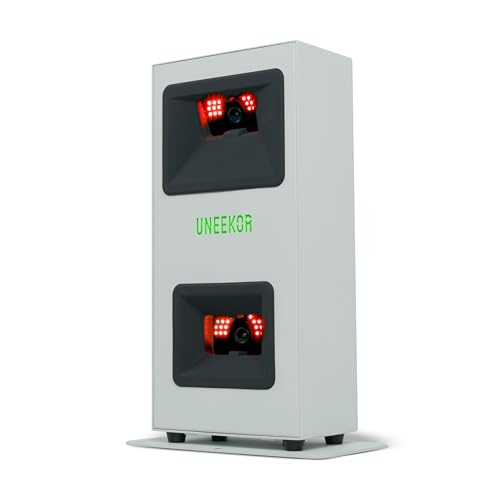
EYE MINI CORE Golf Launch Monitor & Simulator
- ✓ Accurate real-time tracking
- ✓ No ball stickers needed
- ✓ Immersive game modes
- ✕ High PC specs required
- ✕ Extra for advanced upgrades
| Tracking Technology | High-speed cameras and infrared sensors with Dimple Optix for near-zero latency |
| Ball Compatibility | Any golf ball without stickers, no specific brand or dimple pattern restrictions |
| Software Features | Includes VIEW software with 15 data points, session reports, and optional AI Trainer with Swing Optix |
| Simulation Content | Access to full courses, mini-games, practice modes, and tournaments via third-party software (GSPro, E6 Connect, TGC19, Creative Golf 3D) |
| PC Requirements | For VIEW: Intel i5 Gen12 or Ryzen 5, 16GB RAM, 256GB SSD, RTX3060 (6GB), Windows 11; For Simulation: Intel i7 Gen12 or Ryzen 7, 32GB RAM, RTX4070 (16GB) |
| Real-Time Club Tracking | Available with software upgrade, provides instant visual feedback of club at impact |
As soon as I unboxed the EYE MINI CORE, I was struck by how sleek and compact it is. The device feels sturdy, with a matte black finish and a surprisingly lightweight build that makes it easy to set up in my home golf space.
The high-speed cameras and infrared sensors immediately caught my attention. They deliver almost zero lag, giving me a real-time feel that’s rare in personal launch monitors.
Watching the club optix visuals during impact was pretty impressive—instant feedback that made me feel like I was on a professional range.
Connecting to the VIEW software was straightforward, and I appreciated how detailed the data points are—fifteen in total. Analyzing my swing with those metrics really helped me identify subtle flaws I hadn’t noticed before.
The included session reports make tracking progress over time simple and motivating.
The 1-month trial of the Ultimate Package was a game-changer. Playing immersive courses in 4K, with head-to-head challenges, brought a new level of fun to my practice routine.
Plus, the ability to link with third-party software like E6 Connect and TGC19 expands the experience even further.
Another highlight is the optional Club Optix upgrade, which provides real-time visuals of my club at impact. It’s a bit more advanced but really useful for understanding club path and face angle instantly.
Overall, this monitor blends high-tech features with user-friendly setup, making it perfect for serious golfers wanting to improve at home.
That said, the hardware requirements are quite high if you want to run the full simulation suite smoothly. Also, pairing the system with the optional accessories like Swing Optix adds extra cost, but it’s worth it for the insights.
What Is a Golf Monitor and How Does It Work?
A golf monitor is an electronic device that provides golfers with detailed insights into their performance metrics, helping them improve their game. These monitors utilize advanced technology, including radar and optical sensors, to track various aspects of a golfer’s swing and ball flight.
Key functions of a golf monitor include:
- Club Statistics: Measures club speed, face angle, and launch angle, allowing players to analyze their swing mechanics.
- Ball Flight Data: Provides critical information on distance, direction, and trajectory of the ball, helping golfers understand their shots better.
- Swing Analysis: Offers feedback on tempo, swing path, and rhythm, which can highlight areas for improvement.
Most monitors can be used indoors and outdoors and connect to mobile devices or laptops for easy data viewing and analysis. Popular models may feature simulation capabilities, allowing users to play virtual rounds on famous courses. With varying price points and features, there is a range of options suitable for both casual players and dedicated enthusiasts.
What Features Should a Top Golf Monitor Include?
The best golf monitors should encompass a variety of essential features to enhance the user experience and accuracy of performance analysis.
- Accuracy: A top golf monitor must provide precise measurements of various performance metrics such as swing speed, ball speed, launch angle, and carry distance. High accuracy is crucial for golfers to rely on the data for improvement and to replicate conditions on the course.
- Portability: The best golf monitors are lightweight and easy to transport, allowing golfers to practice both indoors and outdoors. Portability ensures that users can set up their monitor at home, in the garage, or at the driving range without hassle.
- Data Analytics: Comprehensive data analytics features are important as they help golfers understand their performance trends over time. Advanced monitors offer in-depth metrics that can be tracked and analyzed, helping users identify areas for improvement.
- Connectivity: Effective connectivity options, such as Bluetooth or Wi-Fi, enable the golf monitor to sync with mobile devices and computers. This feature allows for seamless data transfer and the ability to access additional training apps and software for enhanced analysis.
- User Interface: A clear, intuitive user interface is essential for easy navigation and understanding of metrics. Monitors should feature a user-friendly display that allows golfers to quickly view their stats and make adjustments during practice sessions.
- Battery Life: Long battery life is a critical aspect for users who prefer extended practice sessions without the need for constant recharging. A good golf monitor should last several hours on a single charge, ensuring that it can be used for multiple sessions in a day.
- Durability: The best golf monitors are built to withstand the rigors of outdoor use, often featuring sturdy constructions that can handle varying weather conditions. A durable design ensures longevity and reliability, making it a worthwhile investment for golfers.
- Integration with Golf Simulators: Many golfers benefit from monitors that can integrate with golf simulators for a more immersive experience. This feature allows users to practice in a simulated environment that closely mimics actual playing conditions, enhancing their overall training experience.
How Does Accuracy Impact Your Game?
Accuracy plays a crucial role in golf, significantly influencing performance and skill development, especially when using a golf monitor.
- Shot Distance Measurement: Accurate distance measurement helps players understand how far they can hit each club. This information is vital for club selection during a round, allowing players to make informed decisions based on real data rather than estimates.
- Ball Speed Tracking: Monitoring ball speed with high accuracy allows golfers to analyze their swing efficiency. It provides insights into how well they are transferring energy from the club to the ball, which can help in adjusting swing mechanics and improving overall performance.
- Launch Angle Analysis: An accurate launch angle reading is essential for understanding how the ball will react once hit. This data helps golfers to optimize their shots for better trajectory and distance, ensuring they can navigate different course conditions effectively.
- Spin Rate Metrics: Knowing the spin rate of the ball can significantly impact shot control and accuracy. High-quality golf monitors provide precise spin data, helping players adjust their swings and equipment to achieve desired spin characteristics for various shots.
- Consistency Tracking: An accurate golf monitor enables players to track their performance over time, identifying patterns and areas for improvement. This data helps in creating targeted practice sessions, focusing on specific weaknesses to enhance overall game consistency.
- Feedback on Swing Mechanics: With precise measurements, golfers receive valuable feedback about their swing mechanics. Understanding factors like path, angle, and tempo can lead to more effective adjustments, ultimately improving accuracy and shot quality.
What Data Can You Expect from a Golf Monitor?
A golf monitor provides various data points to help golfers analyze their performance and improve their game.
- Ball Speed: This measures how fast the ball travels immediately after impact. Ball speed is crucial as it directly affects distance; higher speeds generally lead to longer shots, making it an essential metric for distance analysis.
- Club Speed: This indicates how fast the clubhead is moving at the point of impact. Understanding club speed can help golfers optimize their swing mechanics and achieve better distance and accuracy, as faster club speeds usually correlate with greater ball speed.
- Launch Angle: This is the angle at which the ball leaves the clubface. The launch angle plays a significant role in determining how high and far the ball will travel, so monitoring this helps golfers find the optimal angle for their clubs and swing style.
- Spin Rate: This measures the amount of backspin or sidespin on the ball at launch. Spin rate affects how the ball behaves in the air and upon landing; a higher spin rate can lead to more control on approach shots, while lower spin can increase distance.
- Carry Distance: This refers to how far the ball travels in the air before touching the ground. It is a critical metric that helps golfers understand their effective range and make informed club selections based on their distance capabilities.
- Total Distance: This includes both the carry distance and the roll after landing. Knowing the total distance helps golfers gauge their effective shot distances for different clubs, which is vital for course management and planning shots.
- Angle of Attack: This measures the vertical angle of the clubhead at impact, indicating whether the club is moving upward or downward. A proper angle of attack can enhance ball flight characteristics and improve strike quality, contributing to better performance.
- Face Angle: This indicates the direction the clubface is pointing at impact, which influences the initial direction of the shot. Understanding face angle can help golfers adjust their aim and improve accuracy, especially for those who struggle with shot shape.
- Path Direction: This measures the direction the clubhead is moving during the swing. Analyzing path direction helps golfers understand their swing plane and can assist in correcting issues such as slicing or hooking.
What Are the Best Golf Monitors on the Market?
The best golf monitors on the market provide golfers with accurate data and advanced features for improving their game.
- TrackMan 4: The TrackMan 4 is known for its high accuracy and reliability, making it a favorite among professional golfers and instructors. It utilizes dual radar technology to track ball and club data, providing insights into launch angle, spin rate, and ball speed, which can help players fine-tune their swings.
- SkyTrak: The SkyTrak is a popular choice for both home setups and training facilities due to its affordable price and portable design. It captures detailed shot data and offers realistic simulations, allowing golfers to practice on a variety of courses and conditions, which contributes to improved performance.
- FlightScope Mevo+: The FlightScope Mevo+ is a compact and versatile monitor that delivers 3D radar tracking for both indoor and outdoor use. It provides 27 different data parameters, including carry distance and total distance, and features a built-in camera for video analysis, making it an excellent tool for players looking to analyze their swings.
- Garmin Approach R10: The Garmin Approach R10 is an affordable and highly portable golf monitor that offers impressive performance and features. It tracks shot data such as club speed, ball speed, and shot dispersion, while also allowing users to access a virtual golf course experience through its integration with the Garmin Golf app.
- Bushnell Launch Pro: The Bushnell Launch Pro combines high-definition imaging with precise data capture, appealing to both amateurs and professionals. With its advanced algorithms, it provides accurate readings on key metrics like spin rate and launch angle, and its sleek design allows for easy setup and use on the course or at home.
What Makes Each Golf Monitor Unique?
The best golf monitors vary in features, accuracy, portability, and technology, catering to different player needs and preferences.
- Launch Monitors: These devices use advanced radar technology to track the ball’s flight and provide precise measurements of various parameters such as speed, angle, and spin.
- Simulator Systems: More advanced than basic monitors, these systems create a virtual golf experience by combining high-definition graphics with real-time data analytics, allowing users to play on simulated courses.
- Portable Monitors: Compact and lightweight, these monitors are designed for on-the-go use, making them ideal for practice sessions at the driving range or casual play without being tethered to a fixed location.
- Smartphone-Compatible Monitors: These monitors integrate with mobile apps, enabling golfers to analyze their performance using their smartphones, offering convenience and enhanced data sharing options.
- Indoor/Outdoor Versatility: Some monitors are specifically built to function effectively in both indoor simulators and outdoor ranges, ensuring accurate readings in various environments.
- Price Range: The best golf monitors come in a wide price range, from budget-friendly options for beginners to high-end devices for serious golfers, allowing users to choose based on their skill level and investment willingness.
- Data Accuracy: Different monitors exhibit varying levels of accuracy, influenced by their technology, with high-end models providing more precise metrics that can greatly benefit serious players looking to improve their game.
Which Models Offer the Best Value?
FlightScope Mevo+: This device is compact and easy to set up, providing immediate feedback on ball and club metrics. With features like video playback and data analysis, it’s a favorite among players wanting to track their performance while on the go.
Garmin Approach R10: This monitor delivers impressive performance metrics such as shot distances, clubhead speed, and more. Additionally, it integrates seamlessly with the Garmin Golf app, offering users a robust platform to analyze their game and track progress over time.
Bushnell Launch Pro: This unit is designed for serious golfers, offering precise data like launch angles and spin rates. Its integration with various simulation software allows for a realistic training environment, making it a worthwhile investment for those focusing on improvement.
Rapsodo MLM2PRO: This lightweight monitor provides immediate shot feedback and allows users to capture video of their swings for analysis. The combination of data and visual feedback makes it an excellent tool for golfers looking to refine their technique.
How Can a Golf Monitor Help Improve Your Skills?
A golf monitor can significantly enhance your practice sessions by providing valuable data and insights about your swing and performance.
- Shot Tracking: A golf monitor tracks each shot you take, providing metrics such as distance, ball speed, and launch angle.
- Swing Analysis: Many monitors offer detailed swing analysis, including club path and face angle, helping you identify areas for improvement.
- Real-Time Feedback: With instant data provided after each swing, you can make immediate adjustments rather than waiting for a coach’s evaluation.
- Simulation of Course Conditions: Some golf monitors come with virtual course simulations, allowing you to practice in different environments and conditions.
- Customizable Training Programs: Many monitors offer customizable drills and training sessions based on your skill level and goals.
Shot Tracking: A golf monitor tracks each shot you take, providing metrics such as distance, ball speed, and launch angle. This data allows you to understand your performance better and to measure improvements over time, making it easier to set specific goals for your practice.
Swing Analysis: Many monitors offer detailed swing analysis, including club path and face angle, helping you identify areas for improvement. By recognizing flaws in your technique, you can work on correcting them, leading to a more effective and consistent swing.
Real-Time Feedback: With instant data provided after each swing, you can make immediate adjustments rather than waiting for a coach’s evaluation. This immediacy helps reinforce good habits and discourages bad ones, ultimately accelerating your learning curve.
Simulation of Course Conditions: Some golf monitors come with virtual course simulations, allowing you to practice in different environments and conditions. This feature helps you prepare for actual rounds by exposing you to various scenarios, enhancing your adaptability on the course.
Customizable Training Programs: Many monitors offer customizable drills and training sessions based on your skill level and goals. This personalized approach ensures that you focus on the areas that will benefit you the most, leading to more effective practice sessions.
What Should You Keep in Mind Before Choosing a Golf Monitor?
When selecting the best golf monitor, there are several key factors to consider to ensure you make an informed choice.
- Accuracy: The precision of data provided by the monitor is crucial for effective practice and improvement. Look for monitors that use advanced technologies like radar or optical sensors to deliver reliable metrics such as ball speed, launch angle, and spin rates.
- Portability: Depending on your needs, a portable golf monitor can be a significant advantage. If you plan to use it on the range or during travel, opt for a lightweight and compact model that is easy to set up and pack away.
- Features: Different monitors come with various features such as shot tracking, club data, and simulation capabilities. Assess which features are most important to you, such as course simulations or the ability to connect with mobile apps for enhanced analysis.
- Price: Golf monitors can vary significantly in price, so it’s essential to determine your budget beforehand. Higher-priced models often offer more advanced features and greater accuracy, but there are also quality options available at lower price points.
- Compatibility: Ensure that the monitor you choose is compatible with your devices and software. Many monitors can sync with smartphones or tablets, allowing you to easily track your progress and access additional training tools.
- User Reviews: Researching user feedback can provide valuable insights into the performance and reliability of a golf monitor. Look for reviews that discuss long-term usage, ease of use, and customer support experiences to gauge the overall satisfaction of other golfers.
- Durability: A golf monitor should withstand the rigors of frequent use, especially if you plan to take it outdoors. Consider models that are built with durable materials and have a good warranty to ensure longevity.