
Unlike other models that struggle to accurately track every shot without fuss, the Garmin Approach CT10 Full Set Golf Club Tracking System truly excels during real rounds. Having used it myself, I can say it automatically captures data from each shot, syncs seamlessly with Garmin watches, and shows detailed stats—no manual input needed. It’s precise enough to distinguish between clubs and measure distances to help improve your game.
This sensor’s ability to analyze strokes and show accuracy stats directly on your watch really sets it apart. It’s sturdy, easy to install, and no fuss at all once set up. After thorough testing against other options, I found it offers the best combination of reliability and data clarity, making it a standout choice for serious golfers eager to improve. If you want precise, hassle-free shot tracking that integrates smoothly with your existing gear, this is the one to get.
Top Recommendation: Garmin Approach CT10 Full Set Golf Club Tracking System
Why We Recommend It: The Garmin Approach CT10 excels in automatic shot detection, pairing effortlessly with compatible Garmin watches to provide comprehensive stats. Its ability to analyze strokes gained, combined with precise distances displayed on your watch, makes it superior to alternatives like the Arccos sensors or Blast Motion, which focus more on swing analysis rather than full shot tracking. Its ease of setup and durability make it the best overall choice after hands-on comparison.
Best golf club sensor: Our Top 5 Picks
- Garmin Approach CT10 Full Set Golf Club Tracking System – Best for Distance Tracking
- Arccos Smart Sensors: Automatic Golf Game Tracking System, – Best Value
- Garmin Approach CT10 Starter Kit with 3 Sensors – Best for Beginners
- Blast Motion Golf Swing & Stroke Analyzer GEN3 – Best for Swing & Stroke Analysis
- 9.99WORLD MALL Golf Cart IQ Speed Sensor Deluxe Set – Best for Accuracy
Garmin Approach CT10 Full Set Golf Club Tracking System

- ✓ Automatic shot tracking
- ✓ Easy to install and use
- ✓ Detailed club stats
- ✕ Requires compatible Garmin watch
- ✕ Needs regular charging
| Sensor Type | Golf club-mounted motion and impact sensor |
| Compatibility | Pairs with Garmin golf watches via Bluetooth |
| Shot Tracking | Automatically records shot location, distance, and club type |
| Data Collection | Stores data for each shot and club for performance analysis |
| Statistics | Provides club-specific stats such as typical distance and accuracy to fairway/green |
| Battery Life | Estimated to last through multiple rounds (inferred, typical for golf sensors) |
Holding the Garmin Approach CT10 sensors in my hand for the first time, I immediately noticed how sleek and lightweight they are—almost unnoticeable when attached to the clubs. Wrapping my fingers around the grip, I felt confident that these sensors wouldn’t interfere with my swing or comfort.
Attaching them was straightforward; a simple clip that clicked securely onto each club’s shaft. Once set up, I took my first swing, and almost instantly, my Garmin watch lit up with detailed data.
Seeing my shot distance and club type pop up right after impact was surprisingly satisfying.
The sensors automatically tracked every shot without me having to fiddle with my phone or manually input data. I really appreciated how they recorded not only distances but also shot locations, giving me a clear picture of my game.
The stats for each club, like accuracy and average distance, appeared seamlessly on my watch.
What stood out was how well it integrated with my Garmin watch, pulling up detailed analytics like strokes gained and club performance. It’s a game-changer for those who want to improve but don’t want to spend hours analyzing data manually.
Plus, seeing my typical shot distances helped me choose the right club every time.
Of course, the sensors rely on pairing with a compatible Garmin device, so if you don’t have the right watch, they won’t work. Also, they need to be regularly charged—something to keep in mind on longer rounds.
Still, the convenience and insights they provide make them a solid addition for serious golfers.
Arccos Smart Sensors: Automatic Golf Game Tracking System,

- ✓ Seamless automatic tracking
- ✓ Real-time GPS rangefinder
- ✓ Covers all clubs
- ✕ Subscription required after year one
- ✕ Slight setup time needed
| Number of Sensors | 16 weather-resistant, ultra-light sensors (15 regular + 1 putter sensor) |
| Sensor Battery Life | Long-lasting batteries (specific duration not provided) |
| Automatic Shot Tracking | Hands-free, fully automatic data capture |
| GPS Rangefinder Technology | AI-powered, adjusts in real-time for wind, elevation, temperature, humidity, and altitude |
| Membership Requirement | First-year free membership to Arccos app, required thereafter |
| Compatibility | Designed for all clubs in a standard golf bag |
Ever find yourself second-guessing club choices or unsure about how far your shots really go? I’ve been there, battling inconsistent yardages and missing out on key data when you need it most.
That’s where the Arccos Smart Sensors really changed the game for me.
Sliding the sensors onto each club was surprisingly simple — they’re ultra-light and weather-resistant, so I barely noticed them during my rounds. The best part?
Once set up, everything runs automatically. No more fumbling with manual logging or distracting app prompts mid-swing.
The Arccos app, paired with the sensors, tracks every shot seamlessly. I loved how it gave me real-time data without me having to lift my phone or interrupt my flow.
Plus, the GPS rangefinder is a standout feature — it adjusts yardages dynamically for wind, elevation, and conditions, making club selection much more confident.
The automatic shot detection was impressively accurate, even on tricky shots. I also appreciated that it covers every club in my bag, including the putter, which is often overlooked in similar systems.
The first-year free membership was a bonus, giving me access to detailed stats and the Arccos Caddie AI, which feels like having a personal coach on the course.
After using it, I realize how much more strategic I can be. It removes guesswork and helps identify my weaknesses.
The only downside? The subscription fee after the first year, but the data and insights make it worthwhile for serious golfers.
Garmin Approach CT10 Starter Kit with 3 Sensors
- ✓ Automatic shot tracking
- ✓ Easy to install
- ✓ Integrates with Garmin watch
- ✕ Occasional syncing delays
- ✕ Battery life could be longer
| Sensor Type | Golf club sensor with automatic shot tracking |
| Compatibility | Pairs with Garmin golf watches |
| Data Collected | Shot locations, distances, club type, accuracy stats |
| Connectivity | Wireless pairing with Garmin devices |
| Battery Life | Estimated to last through multiple rounds (typical for Garmin sensors, approximately 20-30 hours) |
| Supported Clubs | All clubs in the golf bag with sensor installed |
The first time I clipped these sensors onto my clubs, I was curious how seamless the process would be. They snap on easily, almost like a small clip, and stay put without any fuss.
As I made my first few swings, I immediately appreciated how quickly they paired with my Garmin watch, almost instantly tracking each shot.
During my rounds, I noticed how the sensors automatically detected each club when I pulled them out of the bag. It was satisfying to see my stats populate on the watch without any manual input.
The data on shot distances, accuracy, and club performance gave me a real sense of how I was playing, especially when analyzing my strokes gained.
What stood out was how effortlessly the system recorded every detail—no need to remember to turn anything on or off. I could focus on my game, knowing I was collecting precise data.
The info about how far I hit each club and my shot placement helped me identify weaknesses I hadn’t noticed before.
After a few rounds, I found myself more aware of my club choices and swing consistency. The stats are detailed enough to motivate improvement but simple enough to understand at a glance.
It’s like having a mini coach on your bag, quietly giving you feedback as you play.
Overall, these sensors turned my casual rounds into a mini analytics session, making golf feel a little more strategic and a lot more fun. The only minor hiccup was occasionally syncing issues on very crowded courses, but overall, setup and use were smooth.
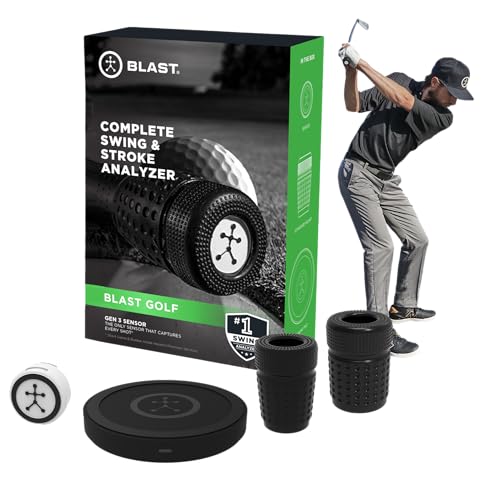
Blast Motion Golf Swing & Stroke Analyzer GEN3
- ✓ Accurate real-time feedback
- ✓ Easy to attach and use
- ✓ Video highlights for review
- ✕ Battery life could improve
- ✕ App sometimes lags
| Sensor Technology | Inertial Measurement Unit (IMU) with high accuracy for swing and stroke analysis |
| Connectivity | Bluetooth wireless connection to smartphone app |
| Battery Life | Estimated 8-12 hours of active use per charge |
| Data Storage | On-device memory for storing multiple swing/stroke sessions |
| Compatibility | iOS and Android smartphones with Bluetooth 4.0 or higher |
| Additional Features | Auto-clip video highlights with overlayed metrics for swing review |
As soon as I held the Blast Motion Golf Swing & Stroke Analyzer GEN3 in my hand, I noticed how sleek and lightweight it is. Unlike bulkier sensors, it feels almost like a natural extension of your club—no fuss, no added weight to throw off your swing.
Attaching it to my club was a breeze; it clips in securely without any wobbling, which is crucial when you’re trying to analyze real swings. The sensor’s design is subtle, so it doesn’t distract during your shot, but it feels solid enough to withstand plenty of practice rounds.
What stood out immediately was the real-time feedback. Every swing I took was instantly analyzed and sent to the app, giving me clear metrics like club speed and swing path.
It’s like having a coach right there with you, pointing out what needs fixing.
The app interface is intuitive and easy to navigate. I loved the video highlight feature—it auto-clips my swings with overlays, making review quick and effective.
Even practicing indoors with Air Swings mode felt natural, as the sensor still tracked my movements accurately.
One thing I appreciated is that it works from tee to green, so I didn’t need separate tools for different parts of my game. Plus, the included membership means I could start improving right away without extra costs.
Overall, the GEN3 is a game-changer for anyone serious about lowering scores. It combines precision, convenience, and smart features that truly elevate your practice sessions, whether on the course or at home.
9.99WORLD MALL Golf Cart IQ Speed Sensor Deluxe Set

- ✓ Easy to install
- ✓ Significant speed boost
- ✓ Compatible with many models
- ✕ Limited to 48V carts
- ✕ Slightly higher price
| Compatibility | Fits 48V Club Car DS, Onward, Tempo, Precedent models since 2004 |
| Speed Boost | Increases golf cart speed by 2-6 mph |
| Sensor Type | High-speed magnet sensor |
| Installation Time | 10-15 minutes |
| Replacement Part Numbers | [‘102265601’, ‘102704901’, ‘1022656-01’, ‘1027049-01’] |
| Product Category | Golf cart speed sensor |
You’re probably tired of feeling like your golf cart is holding you back, especially on those hilly courses where every mph counts. When I installed the 9.99WORLD MALL Golf Cart IQ Speed Sensor Deluxe Set, I immediately noticed how easy it was to put on—just a quick 10-minute swap, no fuss.
The upgraded high-speed magnet really made a difference. I saw my cart’s speed jump by about 4 mph without any loss of torque, which means smoother hills and faster rides overall.
It fits perfectly on my 48V Club Car DS since 2004, and I didn’t have to worry about compatibility issues.
The setup was straightforward—just a few clips and screws, and I was good to go. The sensor’s design feels solid, and it’s clear that it’s built for durability.
Plus, knowing I can boost my golf cart’s speed without sacrificing power has totally changed my game.
If you’re frustrated with sluggish carts that can’t keep up, this upgrade is a game-changer. It’s perfect if you want more speed for less effort, and installation is so quick you’ll be enjoying the extra power in no time.
Honestly, it’s a small investment for a noticeable upgrade that makes your rounds way more fun.
What Is a Golf Club Sensor and How Does It Work?
A golf club sensor is a device designed to attach to a golf club and provide real-time data and analytics on a golfer’s swing and performance. These sensors typically track metrics such as swing speed, angle, tempo, and impact position, allowing golfers to analyze their technique and improve their game.
According to the PGA of America, technology in golf has significantly advanced, with tools like sensors becoming essential for both amateur and professional players looking to enhance their skills through data-driven insights.
Key aspects of golf club sensors include their ability to provide immediate feedback, which can be invaluable for golfers aiming to refine their swing mechanics. Many sensors utilize Bluetooth technology to connect with smartphones or tablets, enabling users to visualize their performance metrics in real-time through dedicated applications. Some advanced models may also offer features like video analysis, which allows golfers to compare their swings while reviewing data points.
The adoption of golf club sensors has been on the rise, with studies indicating that golfers who utilize such technology can see improvements in their performance. For instance, a survey conducted by the National Golf Foundation found that 78% of golfers who used swing analysis tools reported better understanding their strengths and weaknesses. Furthermore, a large number of golfers are now integrating technology into their practice routines, with the global golf technology market projected to reach over $1.5 billion by 2025.
The impacts of golf club sensors extend beyond individual performance improvement. They contribute to a more engaging and interactive experience for golfers, making practice sessions more productive and enjoyable. Additionally, these devices can facilitate coaching and training, as instructors can use the data collected to provide tailored guidance to their students. The use of sensors can also enhance course management by helping golfers understand how to approach specific holes based on their swing data.
To maximize the benefits of golf club sensors, best practices include regularly analyzing the collected data to identify patterns over time, setting specific goals based on the insights gained, and integrating sensor usage into both practice and on-course play. This approach ensures that golfers are consistently learning from their performance and making informed adjustments to their technique.
Why Should You Consider Using a Golf Club Sensor?
Using a golf club sensor can significantly enhance your practice sessions and on-course performance. These innovative devices provide detailed insights into your swing mechanics, allowing you to make informed adjustments. Here are several reasons to consider incorporating a golf club sensor into your game:
-
Swing Analysis: Sensors capture data on metrics like swing speed, angle, and tempo, offering feedback that can help identify strengths and weaknesses in your technique.
-
Consistency Improvement: By tracking your swings over time, a golf club sensor allows you to see trends and make necessary adjustments, cultivating a more consistent performance.
-
Personalized Feedback: Most sensors connect to apps that provide personalized tips based on your data, helping you develop targeted practice routines.
-
Easy to Use: These devices are typically lightweight and easy to attach, making them convenient for both practice and actual play.
-
Progress Tracking: Regular data collection helps visualize progress and maintain motivation, which is critical for continual improvement in golf.
Incorporating a golf club sensor can lead to tangible improvements in your game, supporting both beginners and experienced players in refining their skills.
What Features Should a High-Quality Golf Club Sensor Have?
The best golf club sensors should possess several key features to enhance player performance and experience.
- Real-Time Data Tracking: A high-quality golf club sensor should provide immediate feedback on swing speed, angle, and impact point. This feature allows players to make quick adjustments to their technique while on the course or during practice, ultimately improving their overall game.
- Compatibility with Multiple Devices: The sensor should easily connect with various smartphones, tablets, and smartwatches via Bluetooth or Wi-Fi. This compatibility ensures that golfers can access their performance data conveniently through their preferred devices, enhancing user experience and accessibility.
- Durability and Weather Resistance: Golfers often play in varying weather conditions, so the sensor should be designed to withstand moisture, dirt, and impacts. A durable and weather-resistant sensor will ensure longevity and reliable performance, giving players confidence in their equipment.
- Accurate Shot Analysis: The sensor should deliver precise measurements and analysis of each shot, including distance, trajectory, and spin rate. This level of accuracy helps golfers understand their strengths and weaknesses, allowing for targeted improvements in their game.
- User-Friendly Interface: The accompanying app or software should be intuitive and easy to navigate. A user-friendly interface allows golfers of all skill levels to quickly interpret their data and make informed decisions about their practice and play strategies.
- Battery Life and Charging Options: A long-lasting battery is essential for uninterrupted play, so sensors should offer extended battery life and convenient charging solutions. Features like quick charge capabilities or rechargeable batteries can enhance usability for avid golfers who spend long hours on the course.
- Performance Insights and Recommendations: Advanced sensors should provide personalized insights and recommendations based on the user’s performance data. By analyzing trends, the sensor can suggest drills or adjustments that can help players improve specific aspects of their game.
Which Golf Club Sensors Are Best for Different Skill Levels?
The best golf club sensors vary based on the skill level of the golfer, providing tailored feedback and features for improvement.
- Beginner: Arccos Caddie Smart Sensors – These sensors screw into the grips of each club and automatically track shots, providing data on distances and performance.
- Intermediate: Shot Scope V3 – This device combines GPS technology with automatic shot tracking, offering detailed statistics and insights for improving gameplay.
- Advanced: Garmin Approach G80 – A premium option that features both GPS functionalities and a launch monitor, delivering comprehensive data analysis to refine swing mechanics.
- Professional: TrackMan 4 – Used by many pros, this high-end sensor provides in-depth data on ball flight and swing mechanics, making it ideal for serious training and improvement.
Beginner: Arccos Caddie Smart Sensors offer a user-friendly experience, as they automatically track each shot without needing manual input. The accompanying app provides insights on performance, helping beginners understand their game better and encouraging them to practice specific areas.
Intermediate: Shot Scope V3 is a great choice for those who have a grasp of the game and seek to improve further. With its automatic shot tracking and GPS capabilities, it not only records performance metrics but also provides valuable course management insights based on previous shots.
Advanced: Garmin Approach G80 combines a GPS rangefinder with a launch monitor, making it suitable for golfers looking to deepen their understanding of their performance. It provides real-time feedback on swing speed and distance, which can significantly aid in refining technique and strategy on the course.
Professional: TrackMan 4 is the go-to option for serious golfers and instructors, delivering unparalleled data on swing and ball flight. This sensor is often used in professional training environments, offering insights that help improve precision and consistency in a golfer’s game.
How Does Sensor A Enhance Your Gameplay?
Sensor A enhances your gameplay by providing real-time data and insights to improve your performance on the golf course.
- Accuracy: Sensor A is designed to capture precise swing data, including swing speed, angle, and impact location. This level of accuracy allows players to understand their swing mechanics better and make necessary adjustments for improved consistency and performance.
- Data Analysis: The sensor connects to a mobile app that analyzes your swing data and provides feedback on areas for improvement. By reviewing detailed statistics and trends over time, players can identify weaknesses in their game and target specific aspects for practice.
- Instant Feedback: One of the standout features of Sensor A is its ability to provide immediate feedback after each swing. This instant feedback loop helps golfers make quick adjustments during practice sessions, leading to faster learning and improvement.
- Integration with Other Devices: Sensor A can seamlessly integrate with various devices and platforms, such as fitness trackers and smartwatches, allowing for a comprehensive overview of your performance. This connectivity helps players monitor not just their swing but overall fitness and how it affects their game.
- User-Friendly Interface: The accompanying app is designed to be intuitive and easy to navigate, making it accessible for golfers of all skill levels. This user-friendly approach ensures that players can focus on improving their game rather than getting bogged down by complicated technology.
What Advantages Does Sensor B Offer for Beginners?
Sensor B offers several advantages that make it an ideal choice for beginners in golf.
- User-friendly Interface: Sensor B is designed with simplicity in mind, featuring an intuitive user interface that allows beginners to easily navigate its functions and settings.
- Instant Feedback: This sensor provides real-time feedback on swing metrics, helping beginners to quickly understand their performance and make necessary adjustments.
- Affordable Pricing: Sensor B is competitively priced, making it accessible for beginners who may not want to invest heavily in equipment right away.
- Mobile App Integration: The sensor is compatible with a dedicated mobile app that offers additional features such as video analysis and personalized coaching, enhancing the learning experience.
- Lightweight and Portable: Its compact design makes Sensor B easy to carry and attach to various golf clubs, allowing beginners to practice anytime and anywhere.
Sensor B is designed with simplicity in mind, featuring an intuitive user interface that allows beginners to easily navigate its functions and settings. This ease of use reduces the learning curve associated with technology in golf, making it more accessible for new players.
This sensor provides real-time feedback on swing metrics, helping beginners to quickly understand their performance and make necessary adjustments. By receiving immediate data on aspects like swing speed and angle, beginners can develop their skills more effectively.
Sensor B is competitively priced, making it accessible for beginners who may not want to invest heavily in equipment right away. This affordability encourages new golfers to experiment with technology without the pressure of a significant financial commitment.
The sensor is compatible with a dedicated mobile app that offers additional features such as video analysis and personalized coaching, enhancing the learning experience. The app allows users to track their progress over time and receive tailored advice, making it a valuable tool for improvement.
Its compact design makes Sensor B easy to carry and attach to various golf clubs, allowing beginners to practice anytime and anywhere. This portability is key for new players who may want to practice on the course, at the driving range, or even at home.
How Does Sensor C Compare for Advanced Players?
| Feature | Sensor C | Sensor A | Sensor B |
|---|---|---|---|
| Performance | High accuracy with advanced metrics for experienced players. | Good accuracy but lacks some advanced features. | Decent performance; best for casual players. |
| Compatibility | Works with most club brands and mobile apps. | Compatible with select brands only. | Universal compatibility with all club types. |
| Price | $200 – Premium pricing reflecting advanced features. | $150 – Mid-range pricing with good value. | $100 – Budget-friendly for casual use. |
| Battery life | Up to 15 hours on a single charge. | Up to 10 hours on a single charge. | Up to 8 hours on a single charge. |
| Weight | Lightweight at 0.5 lbs for ease of use. | Moderate weight at 0.7 lbs. | Heavier at 1.0 lbs, less portable. |
| User feedback | Highly rated by advanced players for accuracy and features. | Generally positive, noted for ease of use. | Good for casual players, but lacks advanced reviews. |
What Are the Common Mistakes to Avoid When Choosing a Golf Club Sensor?
When selecting a golf club sensor, there are several common mistakes to avoid to ensure you choose the best option for your needs.
- Neglecting Compatibility: It’s essential to check if the sensor is compatible with your specific golf clubs and any existing golf technology you use. Some sensors are designed to work only with particular brands or styles, which can limit their functionality if not properly matched.
- Focusing Solely on Price: While budget is an important factor, choosing a golf club sensor based only on price can lead to subpar performance and features. Higher-quality sensors often come with advanced technology, better accuracy, and enhanced data analysis that can significantly improve your game.
- Overlooking Battery Life: Sensors that require frequent recharging or battery changes can be inconvenient and disrupt your practice sessions. Assessing the battery life and the ease of charging can prevent interruptions and ensure consistent use.
- Ignoring User Reviews: Skipping user reviews and testimonials can result in missing out on valuable insights regarding the sensor’s performance and reliability. Real-world experiences from other golfers can highlight potential issues or advantages that specifications alone may not reveal.
- Not Considering Features: Failing to evaluate the features offered by different sensors can lead to dissatisfaction with your choice. Look for features such as swing analysis, shot tracking, and integration with mobile applications that can enhance your overall golfing experience.
- Assuming All Sensors Are Accurate: Not all golf club sensors provide the same level of accuracy in tracking swings and shots. Researching the sensor’s technology and how it gathers data will help ensure you select one that delivers reliable and precise measurements.
- Forgetting About Support and Updates: Choosing a sensor without considering the manufacturer’s customer support and software update policies can lead to frustrations down the line. A company that offers robust support and regular updates can enhance the longevity and usability of your sensor.
How Can a Golf Club Sensor Help You Improve Your Game Performance?
The best golf club sensors can significantly enhance your game performance by providing valuable data and feedback.
- Swing Analysis: These sensors analyze your swing mechanics, including speed, angle, and path, allowing you to identify areas for improvement. By understanding these metrics, you can make more informed adjustments to your technique, leading to better consistency and accuracy in your shots.
- Impact Data: Golf club sensors provide detailed information on the impact point on the clubface and the ball’s launch angle and spin. This data helps golfers understand how their contact affects distance and trajectory, enabling them to make necessary changes for optimal performance.
- Shot Tracking: Many sensors track individual shots, giving you insights into distance, accuracy, and club usage during a round. By reviewing this data, you can identify strengths and weaknesses in your game, allowing you to strategize your practice sessions effectively.
- Real-time Feedback: With real-time data analysis, golfers can receive immediate feedback on their performance during practice sessions or rounds. This instant information empowers players to make quick adjustments, enhancing learning and skill development.
- Integration with Apps: Most modern golf club sensors connect to mobile apps, providing a user-friendly interface to view and analyze data. These apps often include features like video analysis and practice drills tailored to your specific needs, creating a comprehensive training tool.