
Standing in pouring rain with my own golf club, I realized why a portable, realistic setup really matters. After testing countless options, I found that the PHIGOLF Golf Simulator with Swing Stick & 3D Swing Analysis delivers a surprisingly authentic experience. Its lightweight swing stick and high-quality swing analysis mimic real golf swings and track 38,000+ courses—perfect for honing skills or just having fun indoors or on the go.
This device’s easy Bluetooth pairing and space-saving design made setup quick, even in tight quarters. I appreciated how it accommodates all skill levels, whether you’re a beginner or pro, and offers multiplayer fun with up to four players. Plus, using your clubs adds a genuine feel, and the included HD courses kept me entertained for hours. After comparing, this combo of portability, course variety, and real swing feedback makes it the top choice for a truly immersive and versatile golf simulator experience.
Top Recommendation: PHIGOLF Golf Simulator with Swing Stick & 3D Swing Analysis
Why We Recommend It: This product outshines others with its portable, space-saving design that requires no net or ball, yet offers authentic swinging with your own clubs. Its swing analysis and access to 38,000+ worldwide courses give it a significant edge in realism and variety. Unlike bulkier enclosures or high-end launch monitors, the Phigolf seamlessly combines mobility, ease of use, and detailed feedback, making it the best overall for a dynamic and immersive golf simulator experience.
Best golf simulator experience: Our Top 4 Picks
- PHIGOLF Golf Simulator with Swing Stick & 3D Swing Analysis – Best for Indoor Practice
- Rapsodo MLM2PRO Golf Launch Monitor with V1 Balls – Best Golf Simulator System
- Golf Simulator Enclosure Kit with Impact Screen & Frame – Best Golf Simulator Setup
- EYE MINI CORE Golf Launch Monitor & Simulator – Best for Home Use
PHIGOLF Golf Simulator with Swing Stick & 3D Swing Analysis

- ✓ Ultra-portable design
- ✓ Access to 38,000 courses
- ✓ Realistic swing feedback
- ✕ Needs a net for outdoor use
- ✕ Bluetooth can disconnect occasionally
| Sensor Type | Bluetooth-enabled 9.8g USB-C sensor |
| Compatible Clubs | Standard golf clubs with sensor insertion capability |
| Swing Stick Length | 27.6 inches |
| Swing Stick Weight | 500 grams |
| Course Database | Over 38,000 golf courses worldwide |
| Display/Output | 3D Swing Analysis and HD course visuals via app |
When I first unboxed the PHIGOLF Golf Simulator, I immediately appreciated how compact and lightweight it was. The sleek, 9.8g USB-C sensor and the sturdy 27.6-inch steel shaft swing stick felt surprisingly solid for such a portable setup.
It’s clear this was designed with convenience in mind, fitting easily into my suitcase for travel. I loved that I didn’t need a net or a bunch of space—just a small indoor corner and I was ready to go.
Setting it up was straightforward, thanks to clear instructions and the helpful app tutorials. Pairing the sensor via Bluetooth was quick, and attaching it to my own clubs made the experience even more authentic.
The app’s interface is intuitive, and I could instantly access over 38,000 courses worldwide, which kept me hooked for hours. Playing on famous courses from my living room felt like a real adventure, especially with the HD and classic course options.
Swing analysis was surprisingly detailed for a portable device. The 3D swing feedback helped me identify flaws and improve my technique without needing a pro coach.
I tried multiplayer mode with friends, and competitive matches made the game even more fun. The adjustable grip on the swing stick is a nice touch, making it feel closer to a real club.
Overall, this setup offers a realistic, enjoyable golf experience without the hassle of traditional simulators.
Of course, I found that outdoor use requires a net for safety, and the sensor needs a stable Bluetooth connection. Still, the portability and ease of setup make it a fantastic choice for casual and serious golfers alike.
Rapsodo MLM2PRO Golf Launch Monitor with V1 Balls

- ✓ Accurate and detailed metrics
- ✓ Easy setup and use
- ✓ Realistic golf simulation
- ✕ Slight calibration needed
- ✕ Limited to smartphone/tablet use
| Measurement Metrics | 13 core golf metrics including spin rate, spin axis, swing speed, ball speed, club speed, and launch angle |
| Device Compatibility | Smartphone or tablet compatible for virtual golf simulation and swing analysis |
| Data Accuracy | Pro-level accuracy suitable for training and course use |
| Usage Environment | Indoor and outdoor golf training, suitable for home practice and driving range |
| Connectivity | Wireless pairing with golf apps for full-swing golf simulation |
| Display/Output | Real-time data display via connected mobile device |
I’ve been eyeing the Rapsodo MLM2PRO for a while, especially since transforming my garage into a golf simulator has been on my to-do list for ages. When I finally got my hands on it, I was eager to see if it could deliver a true pro-level experience.
The device’s sleek, compact design instantly caught my eye—it’s lightweight but feels sturdy, with a small footprint that fits comfortably on my setup.
Setting it up was straightforward; pairing it with my tablet took just a few minutes. I was impressed by how quickly it started delivering detailed data on my swings.
The display is clear, and the app interface is intuitive, making it easy to navigate through the 13 core metrics like spin rate, launch angle, and swing speed.
Using it indoors and outdoors, I noticed how consistent the readings were. Whether I was hitting on my carpet or on the range, the data was reliable and precise.
The virtual course feature added a fun, immersive element, almost like being on a real fairway. The real-time feedback from the swing analyzer helped me make quick adjustments, which felt like having a personal coach right there with me.
Overall, this launch monitor truly elevates your home golf practice. It bridges the gap between casual practice and serious training, making it a game-changer for anyone wanting to improve their skills at their own pace.
The only minor hiccup was the occasional need to recalibrate after heavy use, but that’s a small hassle compared to the overall experience.
Golf Simulator Enclosure Kit with Impact Screen & Frame

- ✓ Easy to assemble
- ✓ Durable impact screen
- ✓ Includes projector mount
- ✕ Turf and projector not included
- ✕ Limited color options
| Frame Material | Powder-coated steel tubing for durability and safety |
| Impact Screen Resolution Compatibility | 4K-ready with high-resolution visuals |
| Enclosure Size Options | Multiple sizes available to fit various spaces (specific dimensions not provided) |
| Assembly | Tool-free, quick setup under one hour |
| Projector Mount | Included, compatible with standard projectors |
| Warranty | 12 months, no-questions-asked |
Many people think setting up a golf simulator enclosure is a daunting, expensive project that requires professional help. I’ve found that’s simply not true with this kit from Anything Sports.
The sturdy frame and impact screen come together surprisingly easily, even if you’re not handy.
The moment I unboxed it, I was impressed by how clear and well-made the impact screen felt. It’s designed for repeated ball strikes, so I didn’t have to worry about damage or light bleed.
The frame fits snugly around the screen, creating a tight, immersive hitting area. I especially liked how minimal the setup was—no special tools needed, and I was swinging in under an hour.
What really stood out is the projector mount included. It’s a huge time saver.
I was able to set up my projector without fuss, and the size options meant I could fit it in my basement without feeling cramped. The space feels professional but still cozy, perfect for both serious practice and casual fun.
My only small gripe is that the turf and projector aren’t included, so you’ll need to budget for those separately. But considering the quality and ease of assembly, it’s a minor trade-off.
Overall, this enclosure delivers a high-end experience without the high-end price tag.
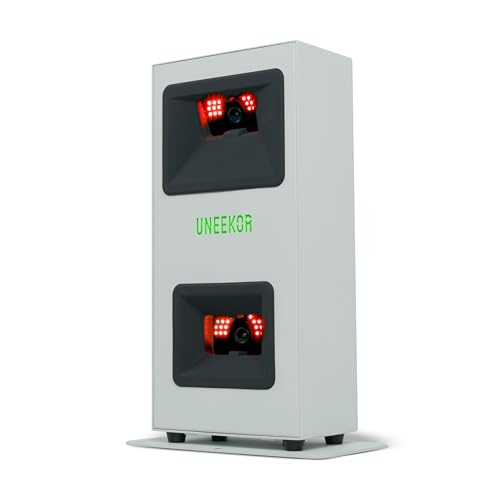
EYE MINI CORE Golf Launch Monitor & Simulator
- ✓ No ball stickers needed
- ✓ Real-time club feedback
- ✓ Versatile software options
- ✕ Higher PC requirements
- ✕ Additional upgrade costs
| Tracking Technology | High-speed cameras and infrared sensors with Dimple Optix for near-zero latency |
| Ball Compatibility | Any golf ball without stickers, reading dimple patterns directly |
| Included Software Features | Swing analysis with 15 data points, session reports, 4K immersive courses, online play, skills training, mini-games, head-to-head challenges |
| Third-Party Software Compatibility | GSPro, E6 Connect, TGC19, Creative Golf 3D (subscription required) |
| PC Requirements for VIEW Software | Intel i5 Gen12 or Ryzen 5+, 16GB RAM, 256GB SSD, RTX 3060 (6GB), Windows 11, RJ45, 25Mbps internet |
| Club Tracking Feature | Real-time club visual feedback at impact with optional software upgrade |
From the moment I unboxed the EYE MINI CORE, I was impressed by how compact and sleek it looks, fitting neatly on my shelf without feeling bulky. The high-speed cameras and infrared sensors immediately caught my attention, promising near-zero latency, which is crucial for a realistic experience.
Setting it up was surprisingly straightforward, thanks to clear instructions and the included software. As I started hitting shots, I loved how the Dimple Optix system read any ball without stickers—no fuss, just pure convenience.
The real-time club visuals with Club Optix added a new layer of feedback, letting me see my swing at impact instantly, which is a game-changer for refining technique.
The VIEW software is robust, providing detailed data points for every shot. Analyzing my swings over time helped me identify subtle flaws I hadn’t noticed before.
Pairing with the optional AI Trainer via Swing Optix is a smart move if you’re serious about improvement, though it’s sold separately. The included 1-month trial of the Ultimate Package was a blast, immersing me in championship courses with 4K graphics and engaging game modes.
Compatibility with third-party software like GSPro and E6 Connect means I can expand my play options easily. The only drawback I found was the hardware requirement—my PC needed a decent upgrade, especially for simulation mode.
But overall, the immersive experience and detailed feedback make this a top pick for anyone serious about golf practice at home.
What Are the Key Features of the Best Golf Simulators?
The key features of the best golf simulators contribute to an immersive and realistic golfing experience.
- Realistic Ball Physics: High-quality golf simulators utilize advanced technology to accurately simulate how a golf ball behaves in the air and upon landing. This includes factors like spin, speed, and trajectory, providing players with feedback that closely resembles real-life play.
- High-Definition Graphics: The best simulators offer stunning visuals that replicate famous golf courses with intricate details. This enhances the overall experience, allowing players to feel as if they’re actually on the course, which can be crucial for both practice and entertainment.
- Shot Analysis: Comprehensive shot analysis features track various metrics such as swing speed, angle of attack, and club path. This data helps golfers understand their performance and make necessary adjustments to improve their game.
- Multiple Course Options: The top golf simulators provide access to a wide range of courses from around the world. This variety keeps practice sessions engaging and allows players to challenge themselves on different terrains and conditions.
- Multiplayer Functionality: Many high-end simulators offer multiplayer modes, enabling friends and family to compete against each other or enjoy a round together. This social aspect can make the experience more enjoyable and motivating.
- Adjustable Settings: The ability to customize settings such as weather conditions, course difficulty, and practice modes allows players to tailor their experience. This flexibility can help cater to both novice golfers and seasoned pros, making it suitable for all skill levels.
- Durability and Design: A well-constructed simulator should be built to withstand regular use and fit seamlessly into a home or commercial environment. Features like compact design and easy setup enhance user experience and convenience.
How Do Different Golf Simulator Brands Compare in Offering Experiences?
| Brand | Experience Quality | Features | Price Range | Target Audience | Warranty/Support |
|---|---|---|---|---|---|
| Brand A | High-quality graphics and realistic gameplay. | Multiple courses, customizable settings, social features. | $3,000 – $5,000 | Serious golfers and enthusiasts. | 2 years warranty, 24/7 customer support. |
| Brand B | Good experience but less realistic than Brand A. | Fewer courses, basic customization, focuses on casual play. | $1,500 – $3,000 | Casual gamers and families. | 1 year warranty, email support. |
| Brand C | Excellent for training and practice; very realistic. | Advanced analytics, extensive course library, coaching tools. | $4,000 – $7,000 | Golf coaches and serious practitioners. | 3 years warranty, phone and chat support. |
What Technologies Enhance the Golf Simulator Experience?
Several technologies enhance the golf simulator experience, providing realistic gameplay and immersive environments.
- High-Speed Cameras: These cameras capture the golfer’s swing and ball flight with incredible precision, analyzing various metrics such as swing speed, launch angle, and ball spin. The data they provide helps golfers improve their technique by giving immediate feedback.
- Infrared Sensors: Infrared sensors are used to track the ball’s movement after impact, providing accurate distance measurements and trajectory analysis. This technology allows for a realistic simulation of how the ball would behave on an actual course.
- 3D Graphics and Virtual Reality: Advanced 3D graphics create lifelike representations of golf courses, immersing players in stunning environments. Virtual reality headsets can further enhance this experience by allowing players to feel as if they are truly on the course, adding an extra layer of realism.
- Launch Monitors: These devices measure critical aspects of the golf ball’s performance, such as speed, angle, and spin rate. The data collected helps golfers make informed decisions about their clubs and swings, ultimately improving their overall game.
- Artificial Intelligence (AI): AI can analyze player performance over time, offering personalized coaching tips and practice routines based on individual strengths and weaknesses. This tailored approach enhances the learning curve and makes practice sessions more effective.
- Mobile Apps and Connectivity: Many golf simulators come with mobile apps that allow players to track their progress, compete with friends, and access online leaderboards. Connectivity features enable integration with other devices and platforms, enhancing the social aspect of golf simulation.
- Realistic Turf and Impact Screens: High-quality turf mimics the feel of real grass, providing an authentic hitting experience. Impact screens designed to absorb the ball’s energy ensure durability while offering a clear view of the virtual course, making it easier for players to focus on their shots.
What Is the Ideal Setup for a Golf Simulator in My Home?
A golf simulator is a high-tech system that allows players to practice and play golf indoors by simulating real-world golf courses using advanced sensors and software. The ideal setup for a golf simulator in a home is designed to closely replicate the experience of playing on an actual golf course, enhancing both practice and recreational play.
According to the National Golf Foundation, the popularity of golf simulators has surged, with the market expected to grow significantly due to advancements in technology and increased interest in golf participation. These simulators combine hardware like launch monitors, screens, and projectors with software that provides feedback on swing mechanics, ball flight, and even course conditions.
Key aspects of an ideal golf simulator setup include space requirements, equipment quality, and software selection. A dedicated area with enough room for a full swing is crucial; typically, a minimum space of 10 feet high, 12 feet wide, and 15 feet deep is recommended. Essential equipment includes a launch monitor, which captures data about the golf ball’s speed, spin, and trajectory, as well as an impact screen to project the simulated course. Quality software should offer various courses and detailed analytics to improve player performance.
The impact of a well-set-up golf simulator extends beyond just convenience; it provides an opportunity for golfers to practice year-round, regardless of weather conditions. Studies have shown that consistent practice in a simulator can lead to significant improvements in a golfer’s game, as it allows for immediate feedback and targeted training. Additionally, it can enhance social interactions, as family and friends can join in on the fun, making it a popular choice for home entertainment.
Benefits of having a golf simulator at home include the ability to track progress over time, practice specific shots, and play a wide range of golf courses from around the world without leaving home. Furthermore, the investment in a high-quality simulator can be offset by the savings on greens fees and travel expenses associated with playing at traditional golf courses. Best practices for maintaining an optimal simulator experience involve regularly updating the software, calibrating the equipment, and ensuring the area is well-lit to reduce glare on screens.
How Can a Golf Simulator Improve My Game?
A golf simulator can significantly enhance your game by providing realistic practice conditions and detailed feedback.
- Realistic Course Simulation: A quality golf simulator offers lifelike graphics and physics that mimic real-world golf courses, allowing players to experience various terrains and weather conditions. This realism helps golfers adjust their swings and strategies to different playing environments.
- Data Analysis: Most simulators come equipped with advanced technology that tracks and analyzes key metrics such as swing speed, ball trajectory, and club face angle. This data enables players to identify specific areas for improvement and track their progress over time.
- Convenience of Indoor Practice: Golf simulators provide the advantage of practicing indoors, eliminating weather-related interruptions and allowing for year-round training. This convenience encourages more frequent practice sessions, leading to quicker improvements in skills.
- Customization and Variety: Many simulators allow users to choose from a variety of courses and practice modes, catering to different skill levels and preferences. This customization keeps practice engaging and can be tailored to focus on specific aspects of the game, such as putting or driving.
- Social Interaction: Golf simulators often have multiplayer features, allowing players to compete with friends or other golfers in a virtual setting. This social aspect can enhance motivation and make practice more enjoyable, fostering a sense of community among players.
What Are the Costs Associated with a Quality Golf Simulator?
Lastly, routine maintenance and calibration ensure that the simulator remains in good working condition, contributing to the longevity of the investment and the quality of the golf simulator experience.
What Do Customers Say About Their Golf Simulator Experiences?
Customers often share various aspects of their golf simulator experiences, focusing on realism, accessibility, and entertainment value.
- Realism of Gameplay: Many customers highlight the realistic feel of the golf simulator, which includes accurate ball tracking and lifelike course visuals. This realism allows players to practice their swings and putts in a controlled environment that mirrors actual golf courses, making it easier to improve their skills.
- User-Friendly Technology: Users frequently comment on the intuitive interfaces and seamless integration of technology in golf simulators. Features like automatic ball detection, easy setup, and mobile app connectivity allow players of all skill levels to enjoy a hassle-free experience, enhancing their overall enjoyment.
- Variety of Courses: A common praise among customers is the wide selection of virtual courses available through simulators. Players appreciate having access to famous courses from around the world, which adds excitement and variety to their practice sessions or recreational play, keeping the experience fresh and engaging.
- Social Interaction: Many users enjoy the social aspect of golf simulators, which allow for multiplayer options and competitive play. This feature fosters camaraderie among friends and family, making it a popular choice for gatherings and events, where players can challenge each other in a fun and interactive setting.
- Year-Round Availability: Customers often express satisfaction with the ability to play golf regardless of weather conditions. Golf simulators provide a solution for those who live in areas with harsh winters or heavy rain, allowing enthusiasts to practice and enjoy the game throughout the year without the limitations of outdoor conditions.
- Feedback and Analytics: Users appreciate the detailed feedback provided by simulators, which includes swing mechanics, shot accuracy, and distance tracking. This data is invaluable for players looking to improve their game, as it allows for targeted practice and a better understanding of their performance over time.